
Advanced Reports & Analytics
Insights that keep your workforce moving
A dedicated reporting and analytics addon for Clockinator Pro. Build attendance, leave, payroll and productivity reports with charts, data tables and multi-format exports — all inside WordPress.
5 Core Report Areas
Attendance, leave, payroll, department & productivity
Custom Report Builder
Select fields, filters and grouping
CSV · XLSX · PDF
Export reports for further use
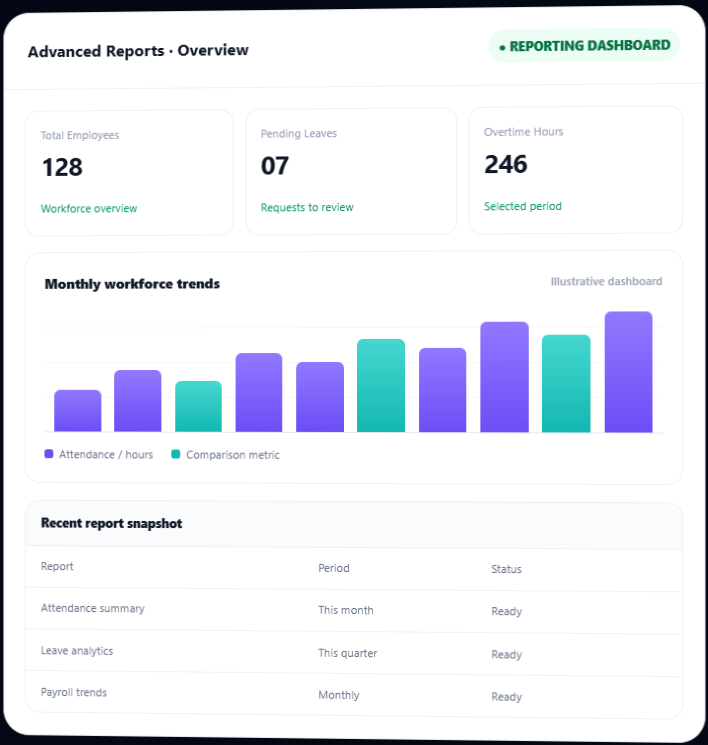
Everything you need to review workforce performance
Bring key people-operations data into dedicated reporting views, with filters and visual summaries to help you understand what is happening across your team.
Attendance Analytics
Review attendance records over a selected period and investigate patterns across employees and departments.
- Date range and employee filters
- Department filtering
- Check-in/out, hours, late arrival and status fields
Leave Analytics
Understand leave activity with filters that help narrow reports by employee, period and leave type.
- Leave type and date-range filters
- Leave records and day counts
- CSV and XLSX exports
Payroll Analytics
Explore payroll cost trends over time and compare payroll costs across departments.
- Monthly payroll expense charts
- Department payroll cost comparison
- Visual summaries of payroll data
Department Performance
Compare workforce measures by department to see how attendance, hours and overtime vary.
- Department overview table
- Attendance comparison chart
- Total hours and overtime metrics
Employee Productivity
Review employee-level productivity metrics and overtime frequency for the selected reporting period.
- Employee productivity report
- Overtime frequency field
- Period-based review
Advanced Overview Dashboard
See high-level workforce metrics before opening a detailed report.
- Total employee count
- Pending leave requests and payroll summary
- Overtime hours and recent attendance summaries
Build reports around the questions you need to answer
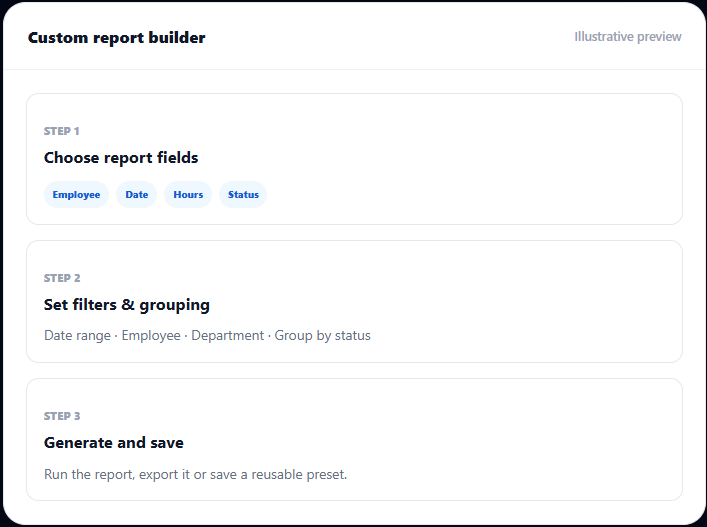
Use the Custom Report Builder to choose report columns, narrow results with filters and group data in a way that suits your review process.
- Select the fields you want included in the report
- Filter by date range, employee and available report-specific criteria
- Group data by employee, department, date or attendance status where supported.
- Save named filter presets and reuse them for recurring reviews
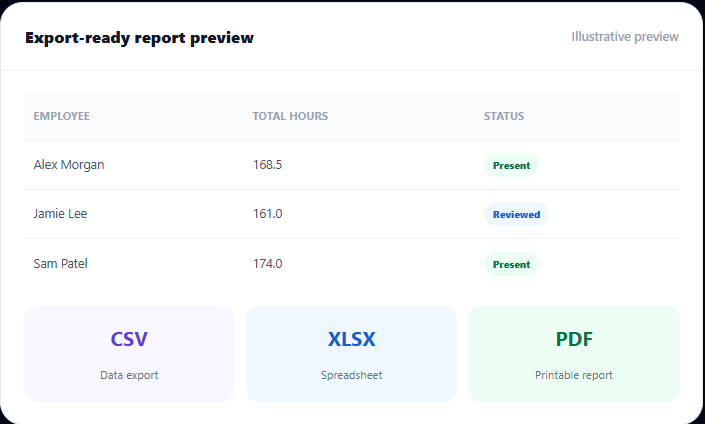
Export reports in formats your workflow already uses
Take report data into spreadsheets, share printable summaries or keep a CSV record for downstream analysis.
- Export attendance reports to CSV and XLSX
- Generate attendance PDF reports in a print-friendly landscape layout.
- Export leave reports to CSV and XLSX.
- Export leave reports to CSV and XLSX.
From raw records to a useful report
Keep report preparation structured so managers and HR teams can focus on the findings.
01
Choose the report
Open attendance, leave, payroll, department or productivity analytics.
02
Apply filters
Select dates, employees, departments or other available report criteria.
03
Review insights
Use report tables, KPI cards and charts to understand the selected data.
04
Export or reuse
Download a supported format or save a report preset for next time.
Useful across HR, payroll and operations
Bring clearer reporting into recurring team reviews, monthly close and day-to-day workforce planning.
HR Teams
Review attendance patterns, leave trends and employee-level records.
Payroll Administrators
Explore payroll trends and compare department payroll costs.
Department Managers
Compare attendance, hours and overtime measures across departments.
Business Owners
Use workforce summaries and exportable reports to support operational reviews.


What you get with your licence
Full technical details, compatibility and support terms for this product.
Advanced Reports & Analytics
$5
Monthly
- All 15+ report types and chart layouts
- Attendance, leave and payroll analytics
- CSV and XLSX export formats
- Custom report builder and saved filter presets
- Print-ready report templates
- Advanced filters and custom date ranges
- Visual summaries, charts and reporting dashboard
- Regular updates and priority support
Frequently asked questions
Important details before adding Advanced Reports & Analytics to Clockinator Pro.
Does this addon work without Clockinator Pro?
No. The addon is designed to extend Clockinator Pro and declares the base plugin as a requirement.
Which reports are included?
The package includes attendance, leave, payroll, department performance and employee productivity reports, plus a reporting overview dashboard.
Can I create custom reports?
Yes. The custom report builder supports choosing fields, applying filters and grouping data by available dimensions such as employee, department, date or attendance status.
Can I save filters for later?
Yes. Saved Reports lets you name and store report filter presets for reuse.
Which export formats are supported?
CSV and XLSX are available for supported report types; attendance PDF export is also included. The exact formats vary by report.
Does it show live or predictive analytics?
The addon provides reports, charts and summaries based on available Clockinator Pro records. The package does not establish AI forecasting or predictive analytics, so those are not advertised here.
Requires Clockinator Pro
This addon extends Clockinator Pro. It works alongside the core plugin and shares the same custom data tables, role system and audit trail.
Make workforce reports easier to build, review and share.
Bring attendance, leave, payroll, department and productivity insights into your Clockinator Pro workflow.