
Process Automation & Approvals
Turn manual workforce approvals into structured, trackable workflows.
Build multi-step approval processes for leave, attendance corrections, overtime, shift changes and expense claims — with role-based routing, SLA escalation, email notifications, comments, attachments and a complete workflow audit trail inside WordPress.
5
Built-in workflow types
Multi-step
Approver routing
SLA
Automatic escalation
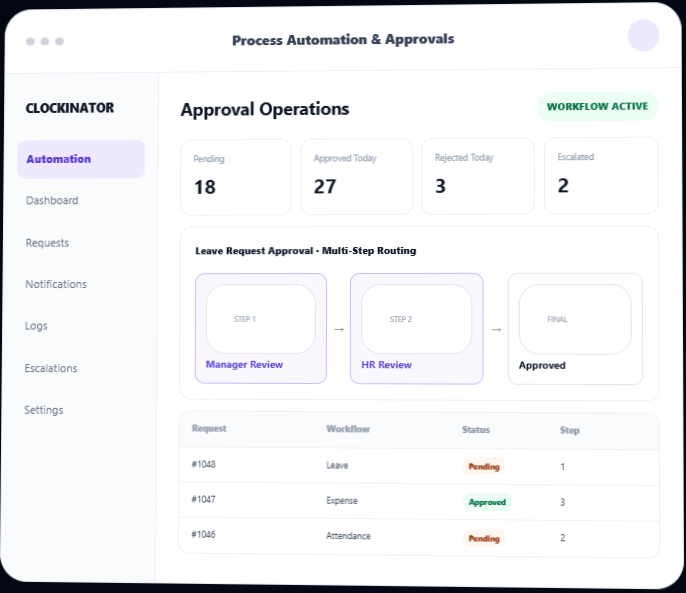
Stop chasing approvals. Give every request a process.
Clockinator Pro already stores the workforce records your team works with. This addon adds a structured workflow layer around those records so requests can be submitted, routed to the right people, reviewed in sequence, escalated when overdue and recorded from start to finish.
Role-based routing
Assign approval steps to Manager, HR Manager, Admin and supported employee roles.
Multi-step approvals
Move requests through sequential approval stages instead of one manual decision.
SLA escalation
Escalate pending approval steps when their configured SLA threshold is exceeded.
Notifications
Notify assigned approvers and requesters through the workflow lifecycle.
Complete audit trail
Record approvals, rejections, changes requested, escalations and system actions.
Request collaboration
Add comments and attachments directly to workflow requests.
Start with the workforce processes your team already uses.
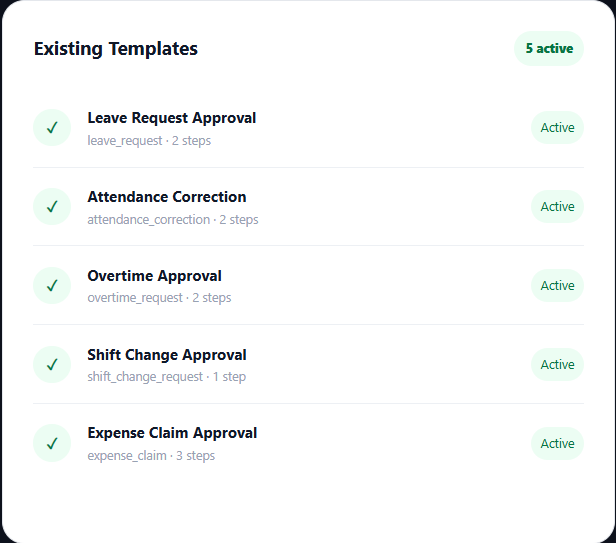
The addon seeds ready-to-use workflow templates for common HR and operations approval scenarios while allowing configurable workflow templates for additional processes.
Leave Request Approval
Route leave requests through Manager Review and HR Review before the leave record is approved.
- Manager Review · 48h SLA
- HR Review · 72h SLA
- Escalation to HR/Admin
- Updates the leave status after approval
Attendance Correction
Review requested corrections to existing attendance records before changing the stored clock-in/out data.
- Manager Review · 24h SLA
- HR Validation · 48h SLA
- Correction fields for in/out times
- Applies approved changes to attendance
Overtime Approval
Submit overtime against an existing attendance record and route it through Manager and HR review.
- Manager Review · 48h SLA
- HR Review · 72h SLA
- Requested hours & reason
- Approved overtime record for payroll workflows
Shift Change Approval
Let employees request a different Clockinator shift with a reason and effective date.
- Manager approval
- Requested shift selection
- Effective date
- Applies or schedules approved shift change
Expense Claim Approval
Submit employee expense claims and route them through manager, HR and finance approval.
- Manager Review · 48h SLA
- HR Review · 72h SLA
- Finance Approval · 96h SLA
- Receipt upload support
Custom Workflow Templates
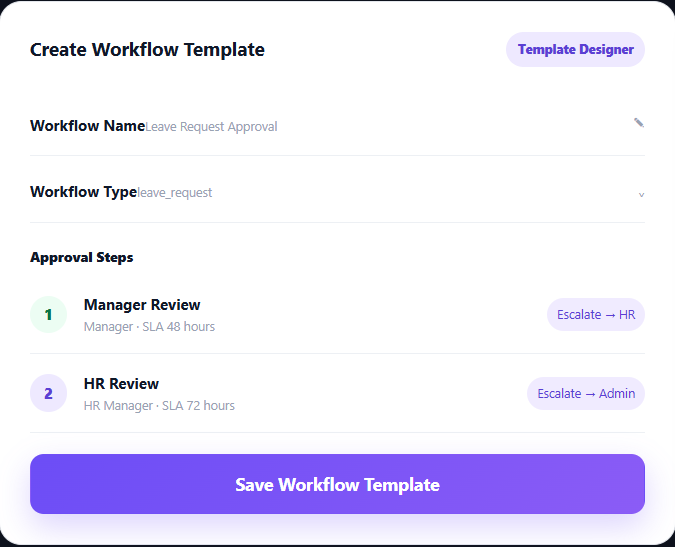
Create additional approval templates using the built-in workflow builder and configurable approval steps.
- Workflow name & type
- Multiple approver steps
- SLA hours per step
- Role-based routing
Build approval chains without rebuilding Clockinator modules.
Create reusable workflow templates and define who reviews each stage and how long the step can remain pending.
Every request follows a clear path from submission to decision.
Requests move through assigned approval steps. A rejection or change request closes the workflow; when all steps approve, the addon can apply the related final action.
1
Submit
Employee or authorized user submits a workflow request.
2
Route
The workflow engine assigns the current step to matching approvers.
3
Review
Approver approves, rejects or requests changes with a comment.
4
Escalate
Overdue pending steps can escalate to the configured role.
5
Complete
Final approval closes the request and applies the workflow action.
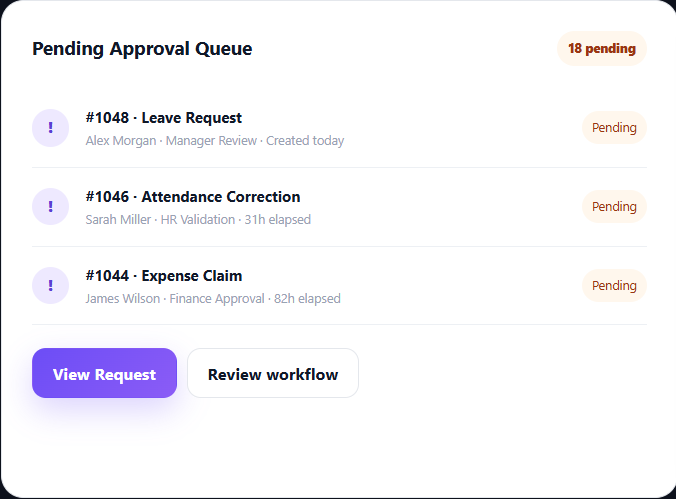
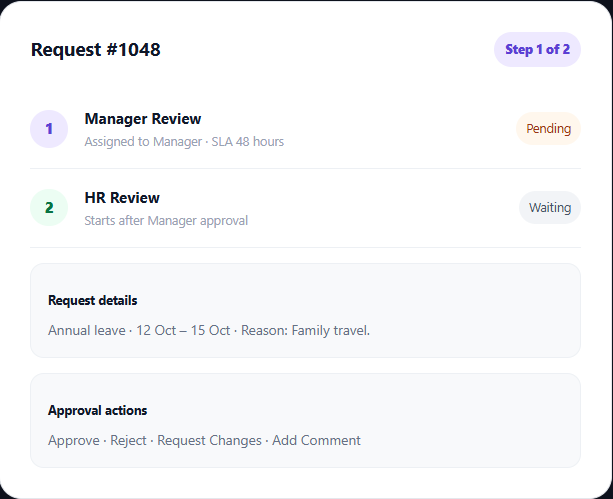
Give managers a focused queue for decisions.
Review pending requests, open request details, take action, collaborate with comments and inspect the complete request history.
Keep approvals moving when people get busy.
Workflow notifications are stored with delivery status, while SLA monitoring creates escalation records for overdue approval steps.
Approval Notifications
Notify assigned approvers when a workflow step starts and notify requesters when their workflow reaches a decision.
- Email channel
- Queued/sent/failed status
- Resend support
SLA Monitoring
Configure SLA hours for individual workflow steps so pending work has a defined response window.
- Per-step SLA
- Pending age tracking
- Automated scan
Escalation History
Review which approval steps were escalated, when they escalated and which role received the escalation.
- Open escalation status
- Escalated role
- Timestamp history
Retry Failed Notifications
Retry queued or failed notification records instead of manually recreating workflow messages.
- Resend individual
- Retry queued/failed
- Delivery status
Know who did what, when and why.
Workflow requests carry an activity history and collaboration layer so approval decisions remain traceable.
Workflow Activity Logs
Review request submissions, step starts, approval decisions, escalations, record updates and other workflow events in a centralized activity feed.
Comments
Approvers and authorized users can add comments to a request to explain decisions, ask questions or document follow-up.
Attachments
Attach supporting files to requests, including receipts for expense claims. Images can be previewed while other files remain downloadable.
Request Detail View
Bring status, current approval step, comments, attachments and request history together in one request detail screen.
Let employees submit and follow requests without living in wp-admin.
The addon provides frontend workflow shortcodes and can inject workflow request interfaces into supported Clockinator employee dashboards.
Workflow Dashboard
Show total requests, pending items, approved requests and rejected requests for the logged-in employee.
- My Requests
- Pending
- Approved
- Rejected
Submit Requests
Employees can submit supported workflow requests and see their existing records from a frontend workspace.
- Leave workflows
- Attendance corrections
- Approval request forms
Pending Approvals
Authorized approvers can access pending approval work from the frontend request experience and take decisions.
- Approve
- Reject
- Request changes
- Add comments
Route work to the right people while keeping workflow administration controlled.
Operational users can participate in workflows while configuration remains restricted to authorized HR/admin roles.
A
Administrator
Full workflow configuration and approval access, including settings and workflow management.
HR
HR Manager
Can participate in approval routing and operate workflow requests according to assigned permissions.
M
Manager
Receives manager-routed approval tasks and can make decisions on assigned workflow steps.
E
Employee
Can submit supported requests and track the status of their own workflow submissions.
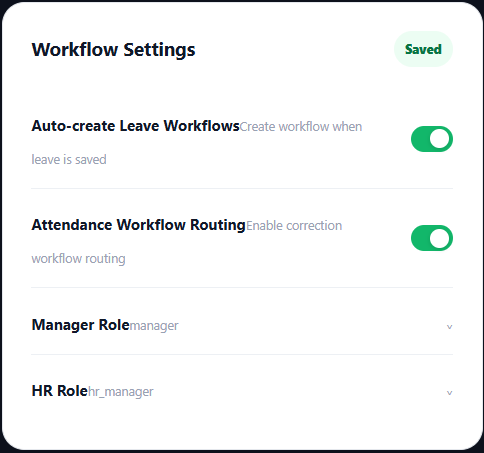
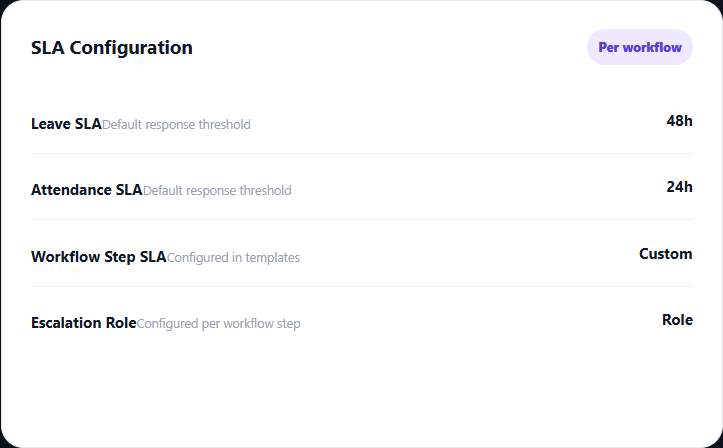
Control how workflows are created and how long approvals can wait.
Configure default workflow behavior for leave and attendance orchestration, including automatic creation and SLA settings.
From request to resolution, without manual follow-up
1
Submit
Employee or authorized user creates a request.
2
Assign
Workflow engine resolves approvers by role.
3
Approve
Each assigned step receives a decision task.
4
Escalate
Overdue approvals move to the escalation role.
5
Apply
Final approval applies the related record action.
Useful anywhere a Clockinator record needs a controlled decision
HR
HR Teams
Standardize leave, attendance correction and employee workflow approvals.
OP
Operations
Give managers a structured approval queue instead of scattered messages and spreadsheets.
$
Finance
Bring expense claims through a manager, HR and finance approval chain before payment.
TM
Team Managers
Review requests assigned to your role, make decisions and leave comments in context.
Bring structured approvals to your Clockinator installation
Use the final BeastThemes commercial price and checkout URL here. The uploaded addon source does not define a public retail price, so this preview intentionally leaves the price as a placeholder.
A complete approval layer for Clockinator Pro
Replace manual approval chasing with configurable workflow templates, role-based routing, SLA escalation, notifications and an auditable request history.
5 built-in workflows
Leave, attendance, overtime, shift and expense.
Workflow builder
Create additional multi-step approval templates.
Escalation engine
Automatically escalate overdue approval steps.
Frontend requests
Employee and approver workflow screens.
Process Automation & Approvals
$5
Monthly
- Multi-step workflow templates
- Leave & attendance approval workflows
- Overtime approval workflow
- Shift change approval
- Expense claim approval
- Role-based approver routing
- SLA-based escalation
- Email notifications & retry tools
- Activity logs & escalation history
- Comments & attachments
- Frontend request and approval views
Frequently asked questions
Everything you need to know before getting started.
Does Process Automation & Approvals work without Clockinator Pro?
No. The addon requires Clockinator Pro to be active.
Which workflows are included?
The package seeds Leave Request Approval, Attendance Correction Approval, Overtime Approval, Shift Change Approval and Expense Claim Approval templates.
Can I create custom approval workflows?
Yes. The Workflow Builder lets authorized administrators create workflow templates with a workflow name/type and multiple approval steps with approver roles and SLA hours.
Can an approval have multiple steps?
Yes. Requests advance through sequential approval steps. The next step starts after all pending approvals in the current step are completed.
What decisions can an approver make?
Approvers can approve, reject or request changes. A rejection or change request closes the current workflow request.
What happens after final approval?
The addon applies the relevant final action. For example, approved leave updates the leave record, approved attendance corrections update the stored attendance values, approved shift changes update or schedule the employee’s shift, and approved overtime/expense claims are recorded for downstream workflows.
Does it support SLA escalation?
Yes. Each workflow step can have an SLA threshold and escalation role. A scheduled escalation scan creates escalation records and notifies the escalation role when a pending step exceeds its SLA.
Are workflow notifications tracked?
Yes. Notifications are stored with their channel and delivery status, and queued or failed email notifications can be resent.
Can requests include attachments?
Yes. Requests support attachments, including receipt uploads for expense claims. Images can be previewed in the request detail screen.
Can employees use the workflow system from the frontend?
Yes. The addon provides workflow dashboard/request shortcodes and can inject workflow request interfaces into supported Clockinator employee dashboards.
Who can configure workflows?
Workflow configuration is restricted to authorized administrator/HR-level users, while managers and other operational roles can participate in assigned approval steps.
Requires Clockinator Pro
This addon extends Clockinator Pro. It works alongside the core plugin and shares the same custom data tables, role system and audit trail.
Every request deserves a clear workflow.
Build structured approvals for leave, attendance corrections, overtime, shifts and expenses — with routing, escalation, notifications and a complete audit trail inside Clockinator Pro.