
Invoicing & Client Billing
Turn tracked project work into a complete billing workflow.
Create invoices from Clockinator Pro projects and billable time, manage client billing profiles, add expenses and taxes, schedule payment plans, automate recurring invoices, accept Stripe or PayPal payments, and keep a clear receivables history — directly inside WordPress.
4
Online payment gateways
2
Export formats
100%
WordPress-native workflow
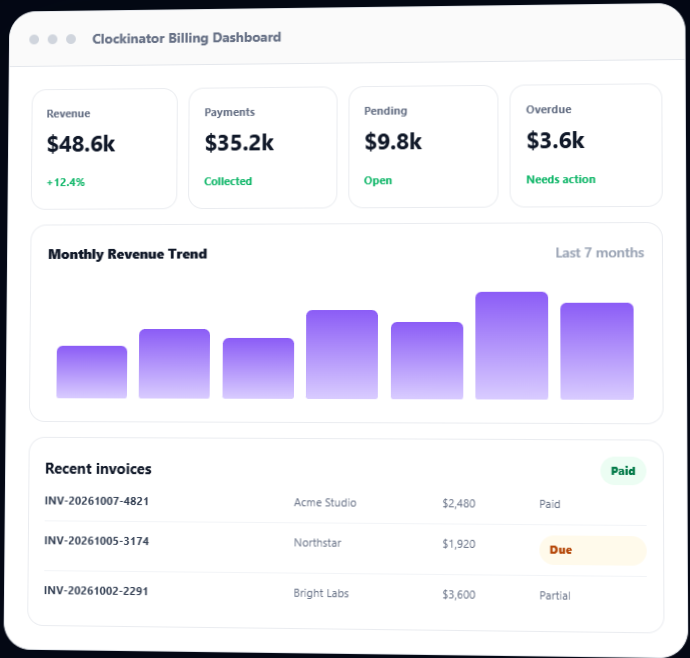
From project work to paid invoice.
Bring your Clockinator Pro projects, clients and tracked work into a structured billing system without moving the workflow to another application.
Invoice from tracked time
Generate invoices from billable tracked hours for a selected project and date range, using the project's configured hourly rate.
Flexible project billing
Configure hourly, fixed-cost, retainer or milestone billing for each project and generate the appropriate invoice lines.
Client billing profiles
Reuse Clockinator Pro client records while adding tax ID, currency, payment terms, billing address and billing status.
Tax management
Create active tax rates, support compound taxes and assign rates globally, per client or per project with project-level priority.
Recurring invoices
Create recurring schedules from invoice templates and let the built-in hourly scheduler generate due invoices automatically.
Payment tracking
Record payments, track invoice status and keep paid, partial, pending and overdue balances visible in the billing workspace.
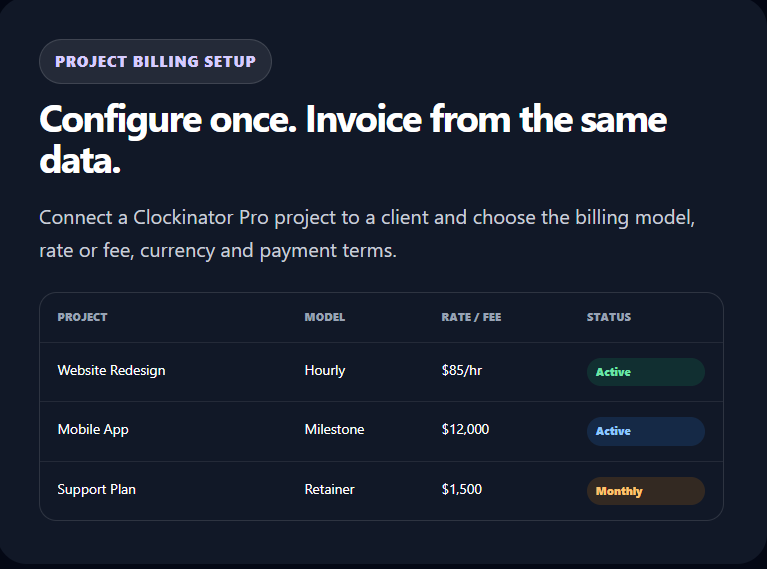
Bill projects the way your business actually works.
Every project can carry its own billing model, client, currency and payment terms. Invoice generation uses the project configuration instead of forcing every customer into the same pricing structure.
- Tracked billable hours × hourly rate
- One fixed project fee
- Recurring retainer fee
- Invoice one or more milestone amounts
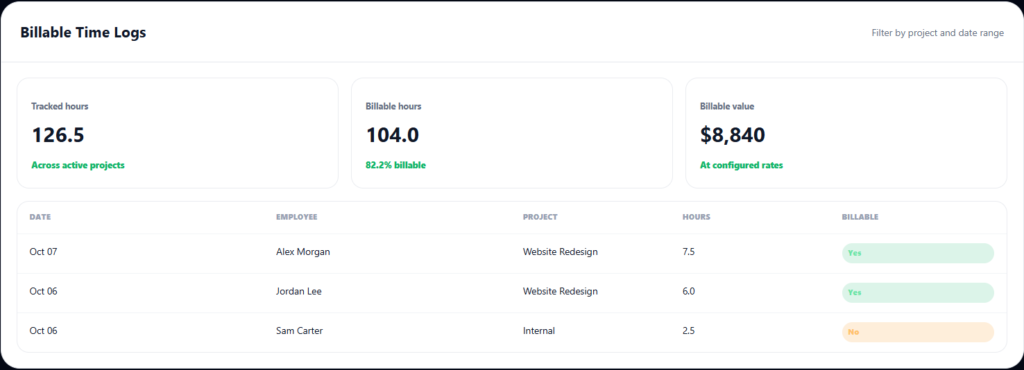
Only bill the time you choose.
The addon reads completed Clockinator Smart Time Tracking sessions and legacy project worktime records, then lets you mark individual logs as billable or non-billable before invoice generation.
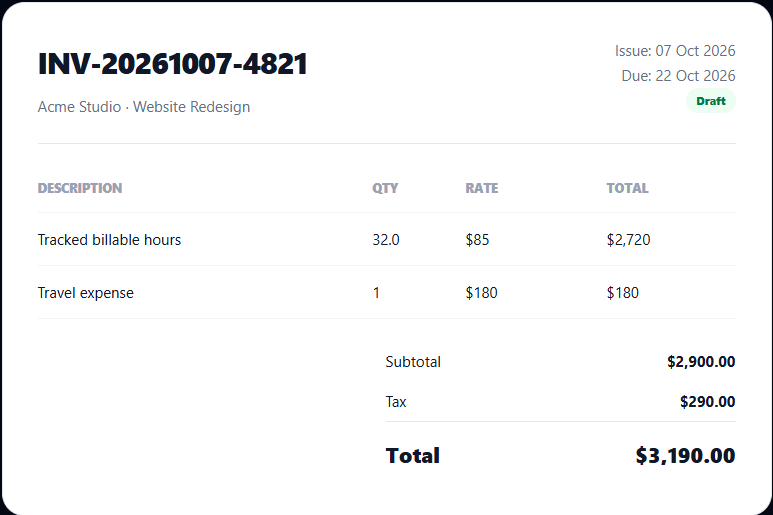
Professional invoices without manual calculations.
Generate invoices from the project billing setup. Hourly projects use billable tracked hours; fixed, retainer and milestone projects use their configured amounts. Billable expenses can then be imported as invoice line items.
- Automatic invoice numbering in the INV-YYYYMMDD-XXXX format.
- Invoice line items with quantity, unit price, total and reference data.
- Invoice status and paid amount tracking.
- Import billable expenses while avoiding duplicate imports.
Capture the costs that belong on the invoice.
Track project expenses, flag them as billable, and apply tax rules to your invoices with clear priority between project, client and global assignments.
Billable expense tracking
Record general, travel, software/subscriptions, hardware, meals, phone/internet, printing and other expenses. Filter by project, client, type, date and billable state.
- Mark expenses billable or non-billable.
- Import billable rows directly into an invoice.
- View totals by expense type and client.
Flexible tax rules
Create named tax rates with percentages, descriptions, active status and compound-tax support.
- Global default tax rates.
- Client-specific tax assignments.
- Project assignments override client and global rules.
Give clients more ways to settle invoices.
Enable Stripe or PayPal, record payments manually, support instalment schedules and keep invoice balances synchronized as payments change.
1
Create
Generate invoice
2
Send
Email or portal
3
Pay
Stripe / PayPal / manual
4
Track
Paid / partial / overdue
5
Reconcile
Statements & refunds
Stripe Checkout
Configure Stripe credentials and create hosted Checkout sessions from invoice payment actions, including portal-originated payments.
PayPal Checkout
Configure sandbox or live PayPal credentials, create orders, redirect for approval and capture completed payments.
Partial payments
Build instalment schedules, generate equal schedules, record payments, waive instalments and synchronize invoice balances.
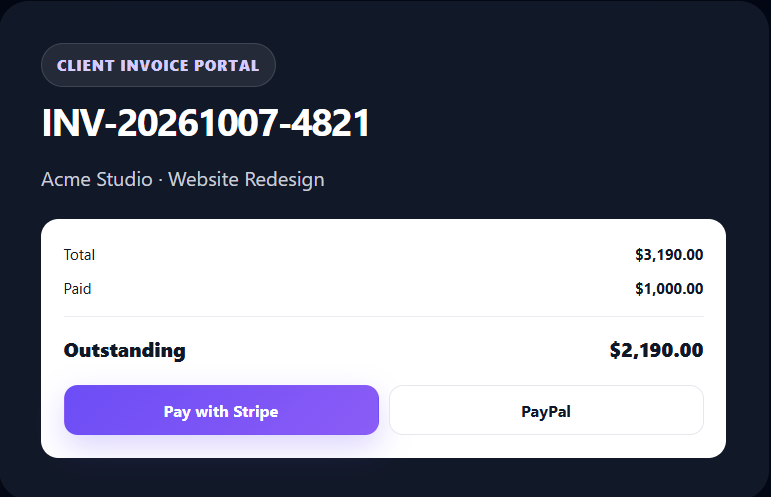
Let clients view and pay invoices without wp-admin.
The addon can expose a token-protected invoice portal view where clients can see invoice information and use configured payment options. Portal links can also be inserted into automated invoice emails.
- Token-protected invoice access.
- Invoice details and outstanding balance.
- Stripe and PayPal payment actions when enabled.
- Portal link placeholder available in invoice emails.
See revenue, collections and outstanding balances clearly.
Built-in billing analytics help you understand invoice activity, payments, expenses, tax totals, top clients and overdue receivables.
Billing dashboard
Revenue, payments, pending invoices, overdue balances, expenses and profit overview with monthly revenue and invoice-status views.
Reports & analytics
Filter by date range and review issued, collected, expenses, net, outstanding, average invoice, tax summary and monthly trends.
Client statements
Generate receivable ledger statements with opening balance, invoices, payments, refunds, closing balance and transaction details.
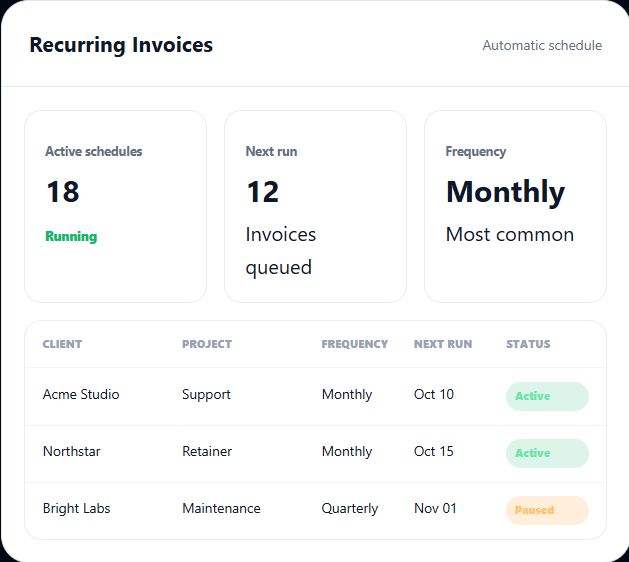
Automate invoices that repeat.
Create a recurring schedule from an invoice template, select the client and project, choose a frequency and next run date, then let the built-in scheduler process due schedules.
- Hourly recurring-invoice scheduler.
- Active / inactive schedule controls.
- Run a schedule immediately when needed.
- Template-based invoice generation.
Handle the exceptions as cleanly as the invoice.
Billing rarely ends with a simple “paid”. Keep credits, refunds, reminders and delivery activity inside the same billing workflow.
Credit notes
Create credit notes against invoices, apply the credit to reduce invoice totals and update the invoice status accordingly.
Refund records
Record refund amount, date, method, transaction ID and note while reducing the invoice's paid amount and recalculating its status.
Invoice email automation
Send invoices now or automate new-invoice, due-soon, instalment-due and overdue reminder emails with configurable templates.
Keep invoices professional and on-brand.
Configure company identity and invoice presentation settings used by invoice PDF/HTML output.
Invoice PDF generation
Generate downloadable invoice PDFs through the addon PDF runtime when DomPDF is available, with invoice lines, totals, tax and due-date information.
Branding controls
Configure business name, company logo, address, terms and footer text for invoice output.
One connected flow from work to revenue.
The addon connects the billing records around the Clockinator Pro project workflow so your team can follow the complete lifecycle.
1
Track work
Clockinator project time
2
Mark billable
Approve time & expenses
3
Generate
Create invoice
4
Collect
Portal, Stripe, PayPal
5
Report
Statements & analytics
Useful anywhere project work becomes revenue.
A
Agencies
Bill client projects by hours, retainers, milestones or fixed fees and include reimbursable expenses.
F
Freelancers
Convert tracked Clockinator project time into clean invoices without maintaining a separate time-and-invoicing system.
C
Consulting teams
Combine hourly work, retainers, expenses, taxes and instalment schedules for client engagements.
R
Recurring services
Use template-based recurring schedules for maintenance, support and subscription-style services.
F
Finance operations
Track paid, partial, overdue and refunded invoices while keeping client statements exportable as CSV.
W
WordPress businesses
Keep workforce, projects, time and billing data inside the WordPress environment you already manage.
Extend your existing Clockinator workspace.
his is an addon, not a standalone billing plugin. It is designed to reuse Clockinator Pro’s client, project and time-tracking records.
Clockinator Pro provides the workforce layer
- Employees, departments, locations and shifts.
- Attendance, leave, payroll and payslips.
- Projects, tasks and time-related records.
- Roles, notifications and administrative workflows.
This addon adds the billing layer
- Clients, project billing and invoices.
- Expenses, taxes and payment plans.
- Recurring invoices and automated reminders.
- Portal payments, statements, credits and refunds.
Invoicing & Client Billing for Clockinator Pro.
Use the addon alongside your Clockinator Pro installation. Insert your final addon pricing below when the commercial price is confirmed.
Invoicing & Client Billing
$5
Monthly
- Invoice generation and lifecycle management
- Project billing, expenses and tax rules
- Stripe, PayPal and payment plans
- Recurring invoices and automated email reminders
- Regular updates and priority support
Frequently asked questions
Everything you need to know before getting started.
Does this addon work without Clockinator Pro?
No. The package declares Clockinator Pro as a required plugin and checks that the Clockinator Pro environment is active before loading the billing functionality.
Can I invoice tracked project hours?
Yes. Hourly project billing can use completed tracked time from the Clockinator Smart Time Tracking records and the supported legacy project worktime records. Time can be marked billable or non-billable before invoice generation.
Which billing models are supported?
Hourly, fixed cost, retainer and milestone billing are implemented in the uploaded addon package.
Can I add expenses to invoices?
Yes. Expenses can be marked billable and then imported into the selected project invoice. Already imported expense rows are skipped automatically.
Does it support taxes?
Yes. You can create tax rates, enable compound-tax behavior and assign taxes globally, to clients or to projects. Project assignments take priority over client assignments, which take priority over global defaults.
Can clients pay invoices online?
Yes. Stripe Checkout and PayPal order/capture flows are implemented. Both can also be used from the token-protected invoice portal when enabled and configured.
Can I create payment plans?
Yes. The addon supports instalment schedules, equal-schedule generation, individual payment recording, waived instalments and synchronized invoice balances.
Does it send invoice reminders automatically?
Yes. The addon includes scheduled email processing for new invoices, due-soon reminders, instalment-due reminders and recurring overdue reminders, with configurable templates and placeholders.
Can I issue credits and refunds?
Yes. Credit notes can be created and applied against invoices, while refunds can be recorded with amount, date, method, transaction ID and notes.
Can I export client statements?
Yes. Client statements include opening balance, invoices, payments, refunds, closing balance and ledger transactions, with CSV export support.
Requires Clockinator Pro
This addon extends Clockinator Pro. It works alongside the core plugin and shares the same custom data tables, role system and audit trail.
Turn Clockinator work into revenue
Track the work, configure the billing model, generate the invoice, collect payment and keep the receivables history — all inside your WordPress workspace.