
Integrations
Connect workforce data to the tools your business already uses.
Bring Clockinator Pro into your wider workflow with accounting exports to QuickBooks and Xero, Google Calendar sync, Slack notifications, Zapier and Make automation, configurable webhooks, and API keys for external applications.
6+
Integration pathways
2
Accounting providers
9
Configurable webhook events
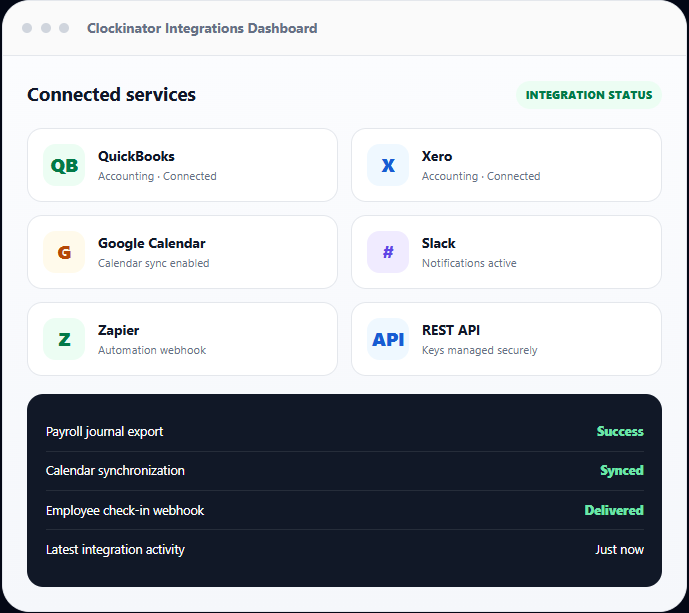
Bring Clockinator into your connected business workflow.
Reduce repetitive exports and manual updates by routing employee events, payroll, calendar items and attendance data to the services your team relies on.
QuickBooks accounting
Connect through OAuth, map payroll fields and account codes, and export payroll journal data manually or automatically when payroll is generated.
Xero accounting
Connect a Xero tenant, configure account-code mapping and journal structure, then send payroll exports with duplicate protection.
Google Calendar
Connect using Google OAuth, choose a calendar and sync supported Clockinator calendar events, with manual and scheduled sync options.
Slack notifications
Send Clockinator events to a Slack incoming webhook and test the connection before enabling notifications.
Zapier & Make
Forward supported business events to Zapier Catch Hook or Make webhook URLs to trigger follow-up actions in other apps.
REST API access
Create named API keys for external apps, retrieve employee and attendance data, and submit check-in events through authenticated endpoints.
Configurable webhooks
Choose an event, endpoint URL, request method, optional secret and custom headers to deliver event payloads to your own system.
Sync logs & retries
Monitor integration status, inspect error messages and retry failed jobs from the integration logs.
Credential protection
Use encrypted storage for supported integration credentials and manage connection status from the addon dashboard.
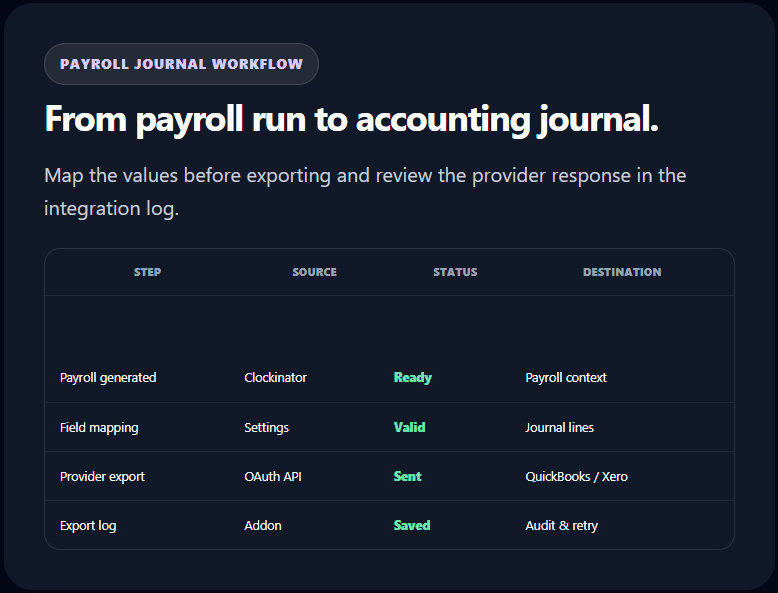
Move payroll data into your accounting workflow.
Connect QuickBooks or Xero to export Clockinator payroll data as journal entries. Choose manual exports or configure automatic export when payroll is generated.
- OAuth connection and disconnect flows for supported providers.
- Map salary, overtime and expense/reimbursement fields.
- Configure currency and overtime multiplier.
- Map accounting codes and journal templates.
- Test provider connections and manually sync payroll.
- Deduplication guard helps avoid repeat exports in a configurable window.
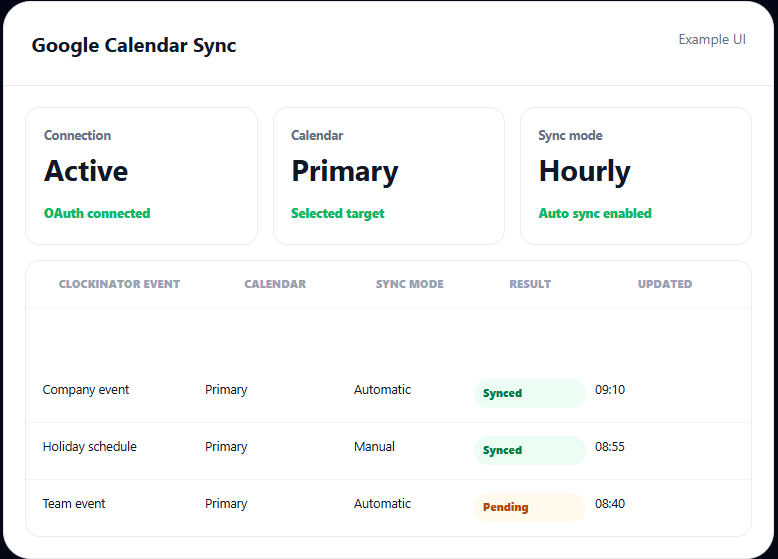
Keep work events aligned with Google Calendar.
Connect a Google account through OAuth, set the target Calendar ID and choose whether automatic sync should run hourly. You can also trigger a manual sync when needed.
- Google OAuth connect/disconnect.
- Choose a destination Calendar ID.
- Manual sync and scheduled hourly sync.
- Token refresh and sync status visibility.
- Sync logs to help investigate connection errors.
Send Clockinator events wherever your workflows live.
Create one or more event-based webhook destinations. Configure the endpoint and request details, then activate, deactivate or delete destinations as your integration setup changes.
Employee Check-In
Notify external systems when an employee clocks in or a supported check-in event is received.
Employee Check-Out
Forward clock-out events to reporting, operations or custom business workflows.
Late Attendance
Trigger a webhook when a late attendance event is detected by the integration bridge.
Leave Requests & Approvals
Send supported leave-request-created and leave-approved events to connected tools.
Payroll Generated
Use payroll generation as a trigger for accounting, notifications or downstream reporting.
Overtime & Task Events
Trigger external workflows for overtime detected and task completed events.
New Employee Created
Notify another system when a new employee record is created in Clockinator.
Biometric Attendance Synced
Forward supported biometric attendance sync events for connected device operations.
QR Kiosk Attendance Synced
Notify other systems when supported QR kiosk attendance sync events occur.
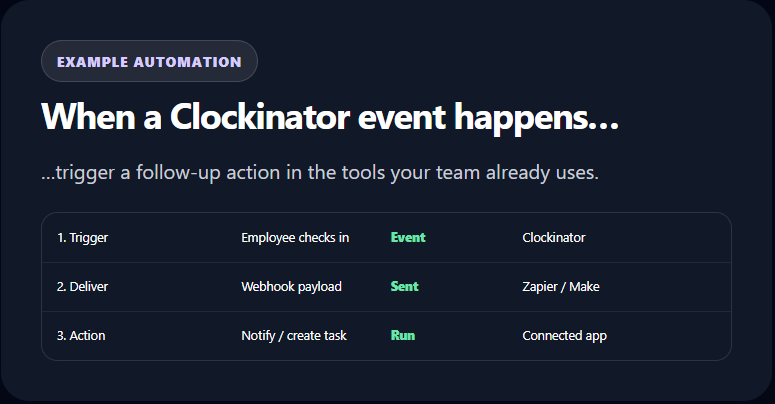
Use Zapier and Make to connect Clockinator to more apps.
Paste a Zapier Catch Hook URL or Make webhook URL into the integration settings. Supported Clockinator business events can then trigger automations in the services available in your Zapier or Make account.
- Separate Zapier and Make webhook configuration.
- Leave a destination blank to disable that platform.
- Send business event payloads from the event bridge.
- Use the integration test broadcast to verify event delivery paths.
- Review delivery status in integration logs.
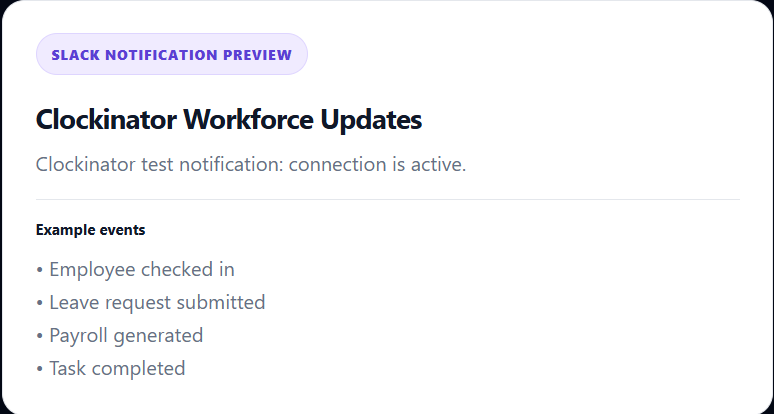
Bring workforce events into Slack.
Configure a Slack webhook URL and send a test notification to confirm the connection. Supported messages include check-in activity, late arrivals, leave requests, payroll generation and task completion.
- Slack incoming webhook configuration.
- Test notification before rollout.
- Event-specific notification messages.
- Central integration dashboard for status and activity.
Connect your own applications with named API keys.
Create and revoke API keys from the admin area, then use the key in an Authorization header to access supported Clockinator endpoints.
Employee endpoint
Retrieve employee data through an authenticated integration endpoint for external applications.
GET /wp-json/clockinator/v1/employees
Attendance endpoint
Read attendance records for supported external reporting and synchronization use cases.
GET /wp-json/clockinator/v1/attendance
Check-in endpoint
Submit a check-in event with an employee ID through the authenticated API workflow.
POST /wp-json/clockinator/v1/checkin
Manage API keys
Create a descriptive key name for a mobile app or custom service, copy the generated secret when shown, track last-used metadata and revoke keys that are no longer required.
Integration test broadcast
Trigger a test check-in event from the dashboard to verify configured webhook, Slack and Zapier/Make delivery paths before depending on live events.
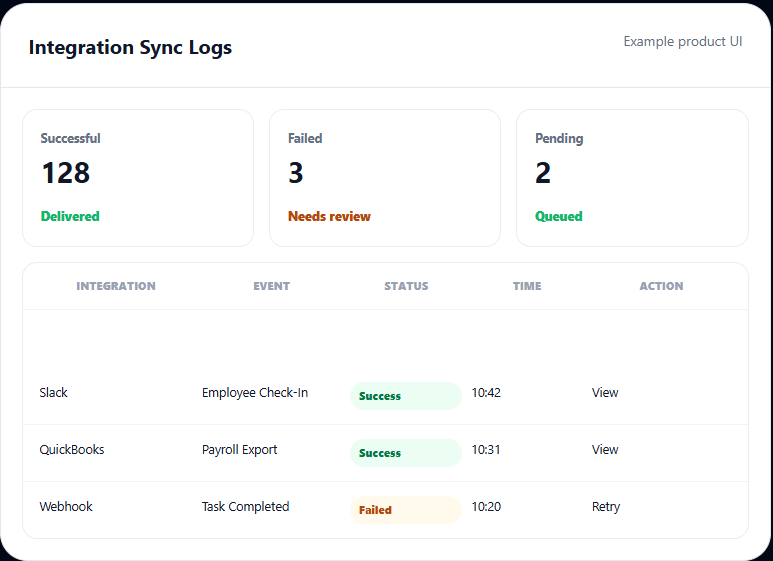
See what synced, what failed and what needs another try.
Use the integrations dashboard and log screens to monitor connection activity, investigate errors and retry failed integration jobs without guessing where a sync stopped.
- Recent activity feed across integrations.
- Counts for connected apps, failed syncs, pending jobs and API requests.
- Integration event, status, error message and timestamp.
- Retry actions for supported failed jobs.
- Accounting export logs and duplicate-export metrics.
Connect once. Automate with confidence.
1
Connect service
OAuth, webhook or API key
2
Configure mapping
Fields, events and endpoints
3
Test
Verify access and delivery
4
Run events
Manual or automated sync
5
Monitor
Logs, errors and retries
For teams that need Clockinator to talk to the rest of their stack.
Finance teams
Export payroll journals to QuickBooks or Xero and reduce repetitive data entry.
Operations teams
Route attendance, leave and task events to Slack or external workflow tools.
People teams
Coordinate company events and calendar activity through Google Calendar sync.
Developers
Use API keys and documented endpoints to build mobile apps, dashboards and internal connectors.
Automation builders
Connect supported Clockinator events to apps available through Zapier and Make.
System integrators
Send event payloads to custom endpoints with configurable methods, secrets and headers.
Extend your existing workforce system.
The Integrations addon adds connection and automation tools to Clockinator Pro rather than replacing its employee, attendance and payroll records.
Clockinator Pro provides
- Employee, department and attendance records.
- Leave, projects, tasks and payroll context.
- Core roles, settings and event sources.
- Shared WordPress administration.
This addon adds
- QuickBooks and Xero accounting sync.
- Google Calendar, Slack and Zapier/Make.
- Configurable webhooks and API keys.
- Integration dashboard, logs and retries.
Integrations for Clockinator Pro.
Install alongside an active Clockinator Pro site. Add your final retail price when the addon offer is confirmed.
Integrations
$5
Monthly
- QuickBooks & Xero accounting exports
- Google Calendar sync
- Slack notifications
- Zapier, Make & webhooks
- REST API access and sync logs
Frequently asked questions
Everything you need to know before getting started.
Does the Integrations addon work without Clockinator Pro?
No. Clockinator Pro must be active. The addon also requires its own valid license to access integration features.
Which accounting services are supported?
The package includes OAuth-based integration flows and payroll journal exports for QuickBooks and Xero, including field/account mapping, manual sync and automatic export when payroll is generated.
Does the addon sync Google Calendar automatically?
Yes. You can enable scheduled hourly sync, select a Calendar ID and also trigger a manual synchronization.
Can Clockinator send events to Slack?
Yes. Configure a Slack incoming webhook URL and use the test notification action to check the connection.
Can I use Zapier or Make?
Yes. Paste a Zapier Catch Hook URL or Make webhook URL in the automation settings. Supported Clockinator events can then be sent to the selected automation platform.
Can I send events to my own backend?
Yes. Create configurable webhooks with an endpoint URL, request method, optional secret and custom headers. The addon also provides API key management for supported REST endpoints.
What webhook events are available?
Supported events include employee check-in/out, late attendance, leave request created/approved, payroll generated, overtime detected, new employee created, biometric attendance synced and QR kiosk attendance synced.
Can I export payroll automatically?
Yes. Accounting settings include an export mode for manual operation or automatic export when payroll is generated. Provider credentials and field/account mapping must be configured first.
How do I troubleshoot failed integrations?
Use the integration dashboard and sync logs to review event status, error messages and timestamps. Supported failed jobs can be retried from the log interface.
Are API keys revocable?
Yes. The API Access panel lets you create named keys and revoke keys that should no longer be used. Treat generated keys as secrets and send them only over HTTPS.
Requires Clockinator Pro
This addon extends Clockinator Pro. It works alongside the core plugin and shares the same custom data tables, role system and audit trail.
Connect Clockinator to your business stack.
Move payroll data, calendar events and workforce activity between Clockinator Pro and the tools your team already uses.