
Field Workforce
Know where the work happens. Keep every field visit accountable.
Coordinate mobile teams with location timelines, route tracking, client visit records, geofence attendance rules and mileage reporting—all alongside your existing Clockinator Pro workforce data.
Timeline
Review location events and timestamps
Route
Track route events and movement history
Geo-Fence Rules
Define allowed attendance zones
Mileage & Visits
Record travel and customer activity
Grow Clockinator Pro with purpose-built addons
Eleven optional modules extend attendance, kiosk flows, device integrations, billing and biometric operations — install only what you need.
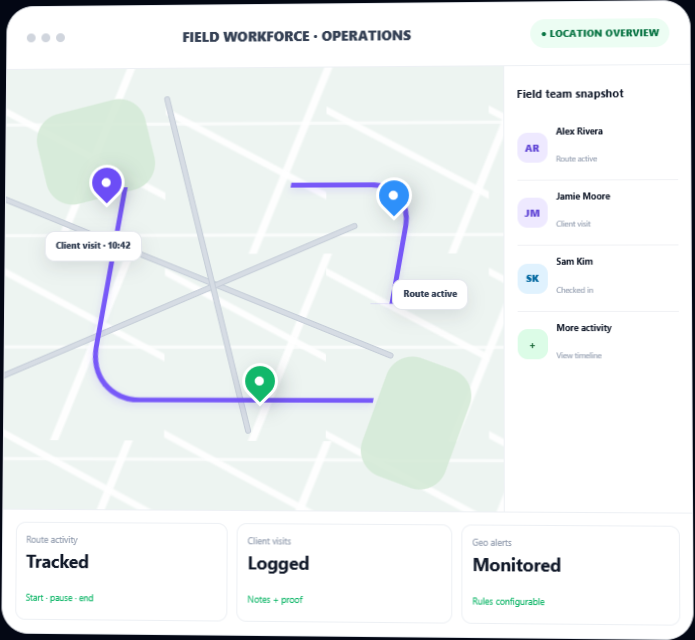
Live Location Overview
Use a map-based admin view to review available employee location snapshots and field activity in one place.
- Map markers with employee and status context
- Filterable snapshots and location records
- Dashboard KPIs for routes, visits and alerts
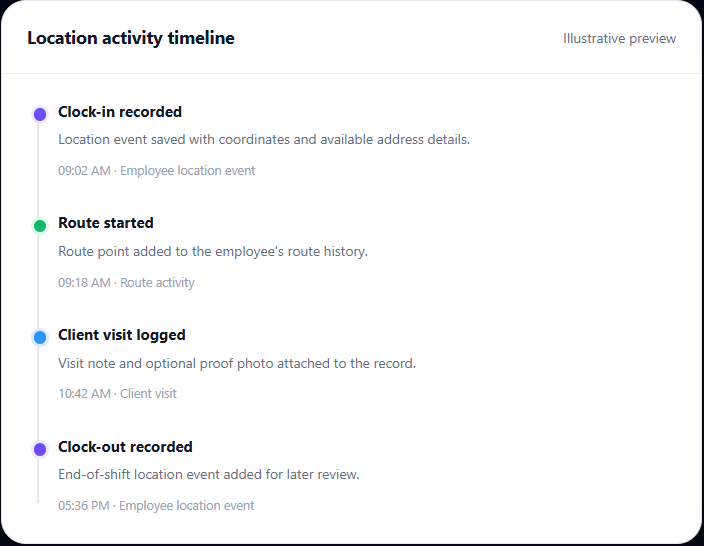
Location Timeline
Keep a chronological record of location-linked events so managers can review when activity happened and where a location was recorded.
- Clock-in and clock-out timeline events
- Coordinates, address and timestamp details
- Filter history by employee and event
Route Tracking & Replay
Record route start, pause, resume and end events, then inspect the route points and summary data on a map.
- Route status controls
- Distance and travel-duration summaries
- Replay recorded route points at adjustable speeds
Geofencing & Attendance Rules
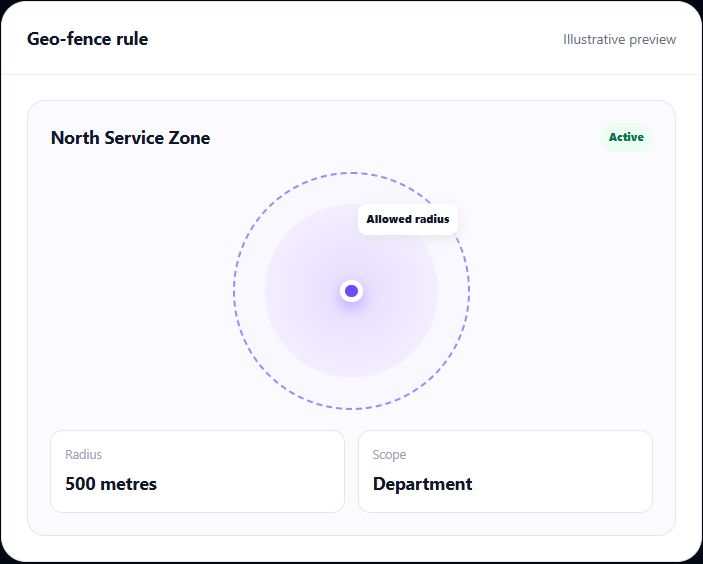
Define location zones by center coordinates and radius, with optional department targeting and configurable enforcement.
- Create and activate geo-fence rules
- Log outside-zone attendance events
- Option to block clock-in/out outside allowed zones
Client Visit Logging
Give employees a structured way to record customer visits from the admin area or supported employee dashboard panel.
- Client name, location and visit notes
- Optional photo upload as visit proof
- Timestamped visit history
Mileage & Travel Expenses
Summarize recorded route distance into mileage logs and calculate travel expenses using your configured per-kilometre rate.
- Distance and rate-per-kilometre records
- Expense totals and period-based summaries
- Review mileage by employee and route
Location Violation Alerts
Surface location-related exceptions so teams can investigate unusual or incomplete field activity.
- Outside-zone attendance
- Route deviation threshold checks
- Missing location log detection and severity labels
Configurable Notifications
Choose how selected field alerts reach the people responsible for follow-up.
- Email recipients
- SMS recipients, where configured by your site
- Slack webhook and general webhook URL settings
Field Operations Dashboard
Bring the most useful field activity indicators together for a quick daily review.
- Employees on field and active route indicators
- Visit, mileage and violation summaries
- Recent timeline, visits and exception activity
Understand the sequence behind every field shift
Location history is more useful when it has context. The addon connects Clockinator Pro clock events with route points and field records, helping managers review the sequence of activity across a working day.
- Review timestamped clock-in and clock-out location events
- Inspect route start, pause, resume and end points on a map
- Use employee, date and event filters to narrow the records you need.
- See route summaries with start/end points, stops, distance and travel duration when data is available.
Trace trips from the first point to the last
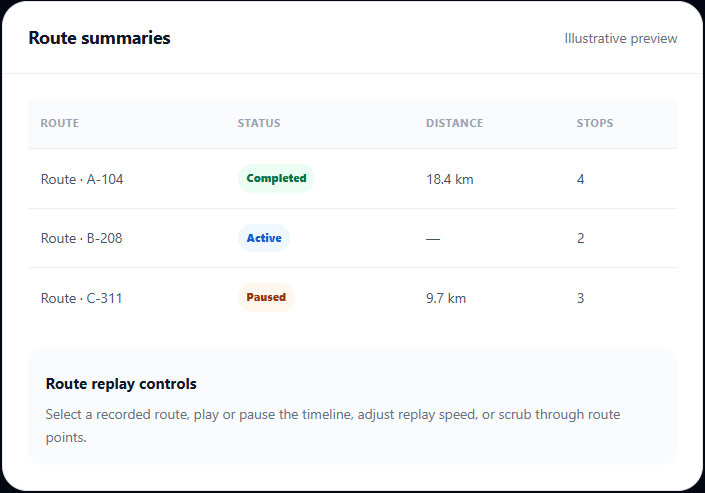
Keep route records connected to employees and their workday. The route panel includes a map visualization, route summaries and event logs for investigating travel history.
- Start, pause, resume and end route events.
- View route points, employee, status and timestamp details
- Review calculated distance and travel-duration summaries
- Replay recorded points at 1×, 2× or 4× speed.
Set attendance zones for location-based work
Configure geo-fence rules around approved work areas, client sites, depots or other locations where attendance should be recorded.
- Set a rule name, center latitude/longitude and radius in metres.
- Optionally scope a rule to a department.
- Choose whether strict geo-fence attendance should block clock-in/out outside applicable allowed zones.
- Review violation events with issue details, timestamps and severity.
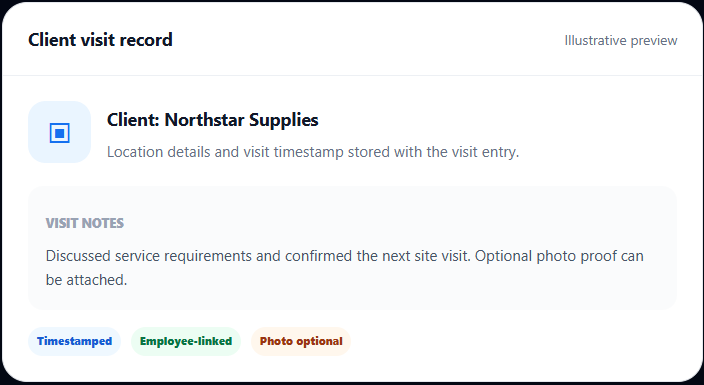
Make customer visits easier to verify
Field employees can record a client name, location and notes, with the option to upload a photo as supporting proof. Managers can review visit history alongside route and location activity.
- Record visits from the addon’s admin screen.
- Allow employees to submit visits through the supported Clockinator frontend dashboard panel.
- Keep visit records timestamped and linked to the employee
- Use visit activity in dashboard summaries and performance views
From attendance to travel summary
Start with the location data your team can capture, then use route, visit and geofence records to support daily operations.
01
Configure field settings
Set the default mileage rate, optional geocoding key, alert recipients, thresholds and geofence rules.
02
Capture location events
Use Clockinator Pro clock events and employee route/visit actions to add location-linked records.
03
Review the map & logs
Inspect location snapshots, route points, visit history and any detected geo-related exceptions.
04
Summarize travel
Review route distance, mileage calculations and travel expense totals for the selected period.
Useful for teams that work acrosse locations.
Bring route visibility, visit records and location-based attendance into the same workforce system your team already uses.
Field Service Teams
Review technician route activity, visit notes and location-linked attendance records.
Sales & Client Visits
Keep customer visit logs with timestamps, notes and optional photo proof.
Delivery & Logistics
Review route points, distance summaries and travel activity for field employees.
Multi-site Operations
Set allowed attendance zones and review outside-zone or missing-location exceptions.
What you get with your licence
Field Workforce features, technical compatibility and support for your Clockinator Pro setup.
Field Workforce
$5
Monthly
- Location timeline and field activity records
- Route tracking, route replay and distance summaries
- Geofencing rules and location violation monitoring
- Client visit logs with notes and optional photo proof
- Mileage calculations, travel summaries and configurable alerts
Frequently asked questions
Key details to know before adding field workforce features to your Clockinator Pro installation.
Does Field Workforce work without Clockinator Pro?
No. The addon checks for an active Clockinator Pro installation and displays an admin notice if the base plugin is unavailable.
Can I restrict clock-in and clock-out to approved zones?
Yes. Enable strict geo-fence attendance and configure active rules. Test browser/device location permissions and rule coverage before using this as an enforcement control.
Can the addon calculate mileage costs?
It calculates route distance and uses a configurable default rate per kilometre to create mileage and expense summaries. Confirm your rate and reporting requirements during setup.
Does it continuously track GPS in the background?
The addon records location-linked attendance events and route points when location coordinates are available. It should not be presented as continuous background GPS tracking on every device.
Can employees record customer visits?
Yes. The supported employee dashboard panel includes client visit entry with location details, notes and an optional image upload.
Do I need a Google Maps API key?
The settings include an optional Google Maps API key for geocoding address text. The addon also has map-based route visualization; configure the key if you need the supported geocoding functionality.
Requires Clockinator Pro
This addon extends Clockinator Pro. It works alongside the core plugin and shares the same custom data tables, role system and audit trail.
Give your field team a clearer path through the workday.
Bring location timelines, route management, client visits, mileage summaries and geofence monitoring into your Clockinator Pro workflow.