
Biometric Attendance
Make employee attendance faster, more consistent and device-connected.
Manage biometric devices, enroll employees, configure device access windows and record clock-in/out events through Clockinator Pro. Connect compatible fingerprint, facial or other biometric hardware using the addon’s device connector and REST API workflows.
5
Biometric types supported in device configuration
3
Enrollment states and verification workflow
REST
API-based device integration
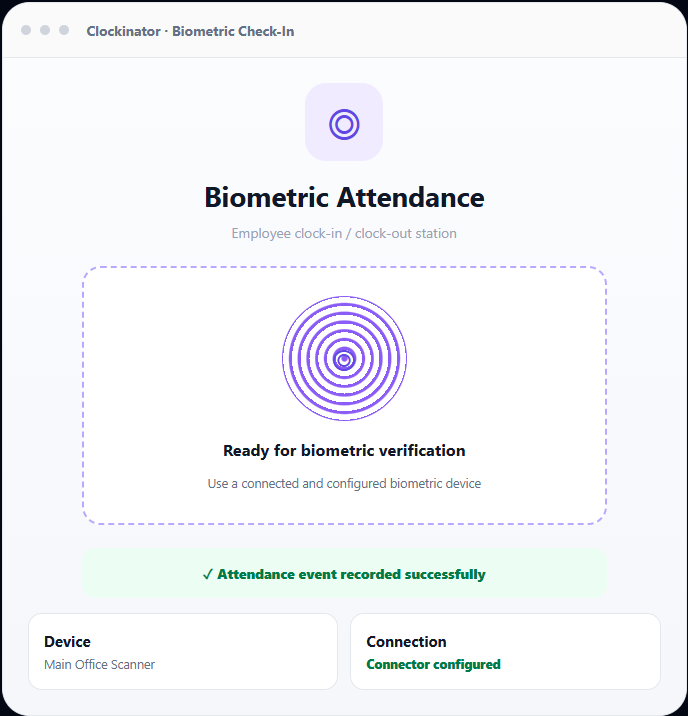
Manage devices, enrollment and attendance in one place.
The addon unlocks a dedicated biometric workflow inside Clockinator Pro, linking device configuration, employee enrollment, clock events and session history.
Multiple biometric types
Configure devices for fingerprint, facial, iris, palm-print or voice-recognition workflows, subject to compatible hardware and connector support.
Biometric device management
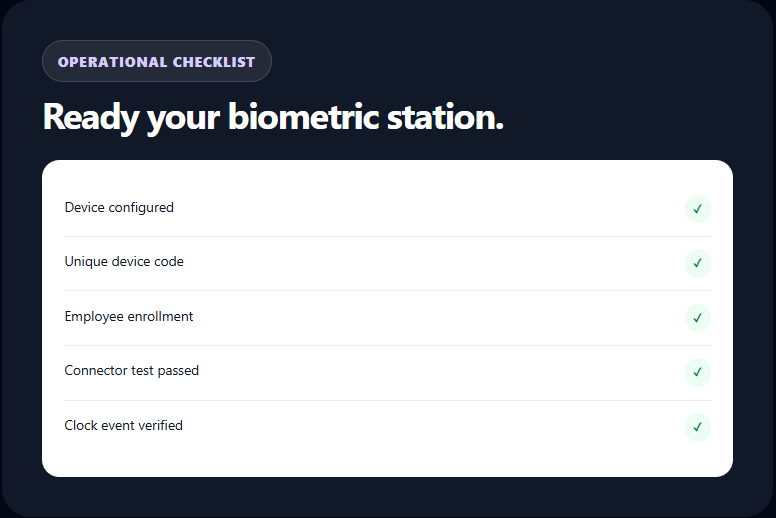
Create, update, activate, deactivate and remove devices. Store a unique device code, type, location and department association.
Employee enrollment
Enroll employees against specific devices, store a biometric identifier and track pending, verified, failed or revoked enrollment states.
Clock In / Clock Out
Record biometric attendance events in the Clockinator Pro attendance workflow and associate the event with its device
Session and audit logs
Review successful clock events and failed attempts with employee, device, session type, timestamp and available match metadata.
Connector and REST API
Configure a device enrollment endpoint and connect supported external biometric systems through API and webhook workflows.
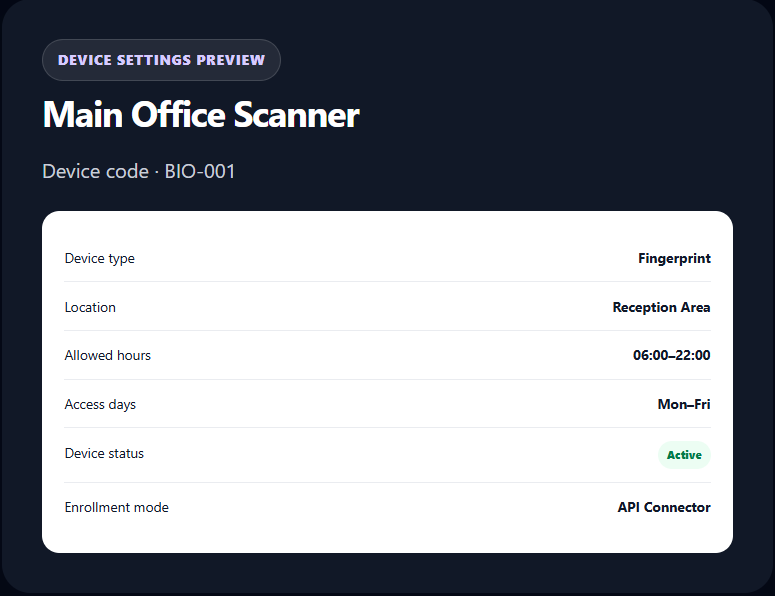
Configure each scanner for its location and working hours.
Manage a fleet of biometric devices from the Clockinator Pro admin area. Each device can have its own unique code, device type, location, department, active status and permitted access window.
- Unique device name and code.
- Fingerprint, facial, iris, palm-print and voice device types.
- Optional location and department association.
- Allowed days of the week and start/end times.
- Active/inactive device status.
- Manual enrollment or API-based enrollment connector configuration.
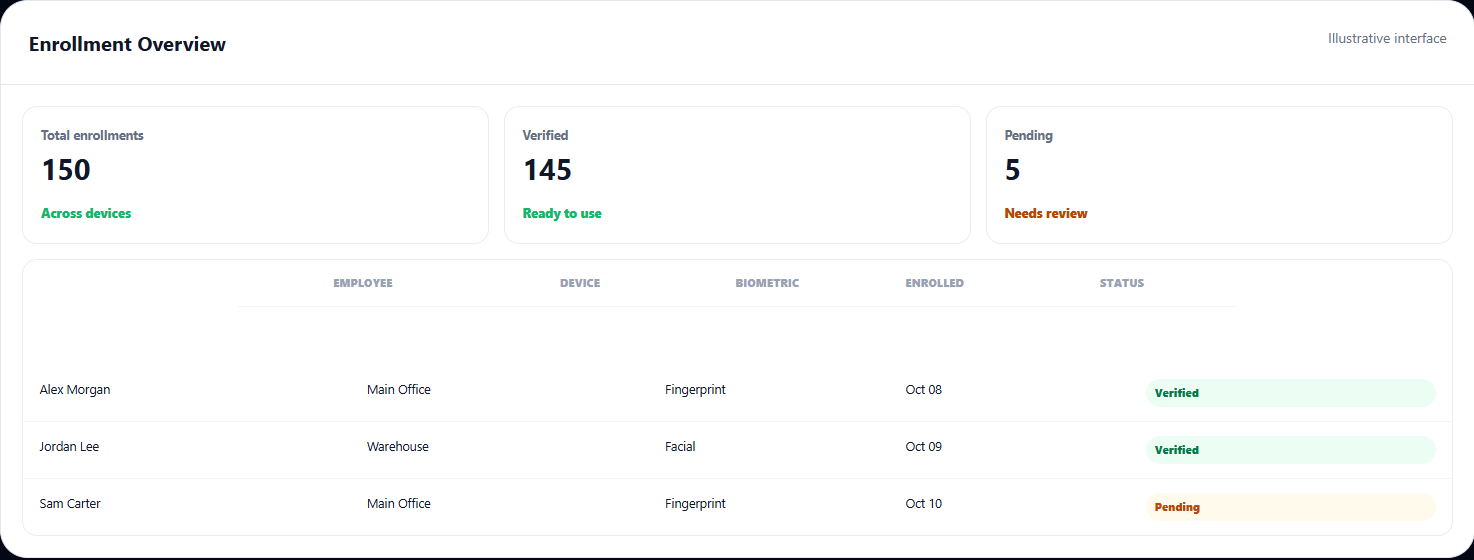
Know who is enrolled on every device
Maintain an employee-to-device enrollment record and track its status instead of treating all employees as automatically registered on every scanner.
Device-specific enrollment
Assign employees to the relevant scanner and store a device-specific biometric ID and enrollment record. A user may have primary and secondary biometric enrollment records.
Verification status
Track enrollment as pending, verified, failed or revoked, and view enrollment dates and last verification details where available.
External capture connector
Configure an API endpoint, HTTP method, authorization token, request payload template and timeout for a compatible device's enrollment/capture service.
Test the connection
Use the connector test workflow to send sample enrollment context to the configured endpoint and inspect the returned status and response.
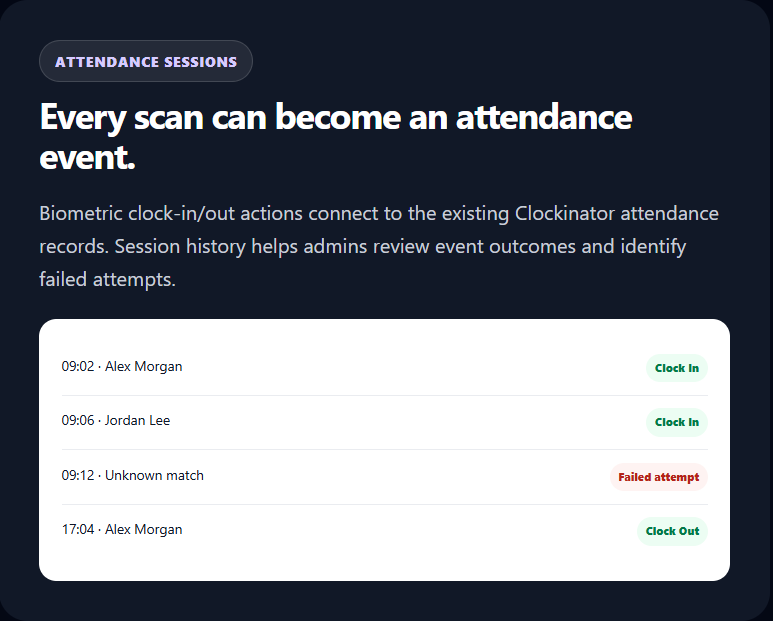
Keep biometric records connected to Clockinator Pro reports.
Successful biometric clock events use the shared attendance workflow so teams can review attendance alongside the wider Clockinator employee and report records.
- Clock-in and clock-out handling.
- Device ID associated with biometric attendance.
- Session logging for successful and failed attempts.
- Employee clock status endpoint.
- Biometric activity statistics and dashboard widget.
Connect a compatible biometricl system to WordPress.
The addon provides REST routes and configurable connector requests. Actual sensor capture and matching are performed by compatible hardware/software that communicates with these interfaces.
Biometric Clock In
Send a user, device and biometric payload to record a clock-in event.
- POST /wp-json/clockinator/v1/biometric/clock-in
Biometric Clock Out
Send a clock-out event through the same configured biometric attendance flow.
- POST /wp-json/clockinator/v1/biometric/clock-out
Device Scan Webhook
Accept a scan event from a configured external device using its device identity and enrollment information.
- POST /wp-json/clockinator/v1/biometric/device-scan
Enrollment API
Enroll an employee to a device with a biometric identifier and optional template payload.
- POST /wp-json/clockinator/v1/biometric/enroll
Device and status routes
Retrieve biometric device records and check a user's biometric status through the registered API routes.
- GET /wp-json/clockinator/v1/biometric/devices
Configurable connector
Set an external endpoint, HTTP method, auth token, payload template and timeout; test the connector from the admin workflow.
Keep employees and administrators informed.
Choose how the system responds when biometric clock-in or clock-out events are recorded.
Email notifications
Notify the employee and administrator about biometric clock events, including employee, device and event time.
Webhook events
Optionally send configured event payloads to an external webhook endpoint for downstream workflows.
SMS option
The notification settings include an SMS toggle and send routine, which can be connected to the site's supported SMS implementation.
Admin dashboard widget
Review biometric activity statistics from a dedicated Clockinator dashboard widget.
Access-time restrictions
Configure device operating days and start/end times to define when the device should be available.
Session review
Use biometric session records to inspect attendance activity and failed attempts during troubleshooting.
Keep device access controlled and auditable.
The addon includes WordPress capability and nonce checks for administrative actions, API permission callbacks, device-level request authorization and session logging. Connectors should be configured to match the security model of the hardware vendor.
- Administrative actions protected by capability checks.
- Nonce validation for admin AJAX workflows.
- Device authorization for device-scan requests.
- Biometric session and action logs.
- Enrollment data linked to a specific employee and device.
Important: Biometric data is sensitive personal data. Use a compatible trusted device/connector, configure secure transport and access controls, and review your organization’s consent, retention and privacy obligations before collecting biometric templates.
From device setup to attendance report.
1
Add device
Name, code, type and hours
2
Connect
Configure compatible endpoint
3
Enroll
Associate employee with device
4
Verify
Device submits scan event
5
Record
Clock event and session log
Built for teams that need a physical attendance station.
Office reception
Connect a fingerprint or facial-recognition station to the daily attendance workflow.
Factories & warehouses
Assign device IDs and operating hours to specific entry points or departments.
Multi-shift teams
Maintain device-specific attendance records for teams working across different schedules.
Campuses
Manage multiple biometric devices and employee enrollment in one WordPress admin system.
Distributed locations
Configure each station with its own code, location, allowed hours and device connector.
Custom biometric setups
Use the REST API and connector settings with a compatible vendor gateway or custom integration.
Extend your existing employee attendance system.
The biometric addon is not a standalone attendance platform. It adds biometric device and enrollment workflows to Clockinator Pro.
Clockinator Pro provides
- Employee records and departments.
- Attendance reports and clock records.
- Existing dashboard and administrative menus.
- Shared WordPress/Clockinator environment.
This addon adds
- Biometric devices and enrollment management.
- Biometric clock actions and REST endpoints.
- Connector configuration and device-scan webhook.
- Biometric sessions, notifications and stats.
Biometric Attendance for Clockinator Pro.
Use the addon alongside your active Clockinator Pro installation. Add the final BeastThemes retail price when the commercial offer is confirmed.
Biometric Attendance
$5
Monthly
- Biometric device management
- Employee enrollment workflow
- Clock In / Clock Out integration
- REST API and connector configuration
- Session logs and notifications
Frequently asked questions
Everything you need to know before getting started.
Does the addon work without Clockinator Pro?
No. The addon declares Clockinator Pro as a required plugin and checks whether the base plugin is active.
Which biometric types can I configure?
The device configuration supports fingerprint, facial, iris, palm-print and voice-recognition types. Actual capture and matching depend on compatible hardware or a vendor connector.
Does the addon include a fingerprint scanner?
No physical scanner is bundled. The addon manages devices and enrollment and provides connector/API workflows for compatible biometric hardware or vendor software.
Does the frontend button perform real fingerprint recognition?
The included shortcode provides a frontend clock interface, but its sample scan button uses placeholder biometric data. For real sensor capture and matching, connect a compatible device or vendor endpoint.
Can I connect an external biometric device?
Yes, when the device or vendor gateway can communicate with the configured enrollment endpoint and/or the Clockinator biometric REST API. You can set the endpoint, method, token, payload template and timeout.
Can I set when a device is allowed to operate?
Yes. Device records support allowed days and start/end times, along with active/inactive status.
Can I enroll one employee on multiple devices?
Enrollment records are associated with both the employee and the device, allowing device-specific enrollment management.
Are biometric clock events visible in attendance?
The addon connects clock-in/out operations to Clockinator Pro attendance records and stores biometric session information, including the associated device.
Can I notify administrators when employees clock in or out?
Yes. Notification settings include employee/admin email notifications and optional SMS/webhook event options.
How should biometric templates be handled?
Biometric data requires careful security and privacy controls. Use a trusted compatible connector, secure transport, restrict access and retention, and follow applicable consent and data-protection requirements.
Requires Clockinator Pro
This addon extends Clockinator Pro. It works alongside the core plugin and shares the same custom data tables, role system and audit trail.
Make biometric attendance part of Clockinator.
Configure your devices, enroll employees and connect biometric clock events to the attendance records your team already uses.