
AI Copilot
AI-powered workforce intelligence for WordPress.
Turn Clockinator Pro workforce data into clear insights, risk signals, forecasts and actionable recommendations. Ask questions in natural language, understand attendance and payroll trends, detect burnout risks and build AI-powered automation rules — directly inside WordPress.
4
AI provider options
30–180
Day forecast horizons
24/7
Workforce intelligence
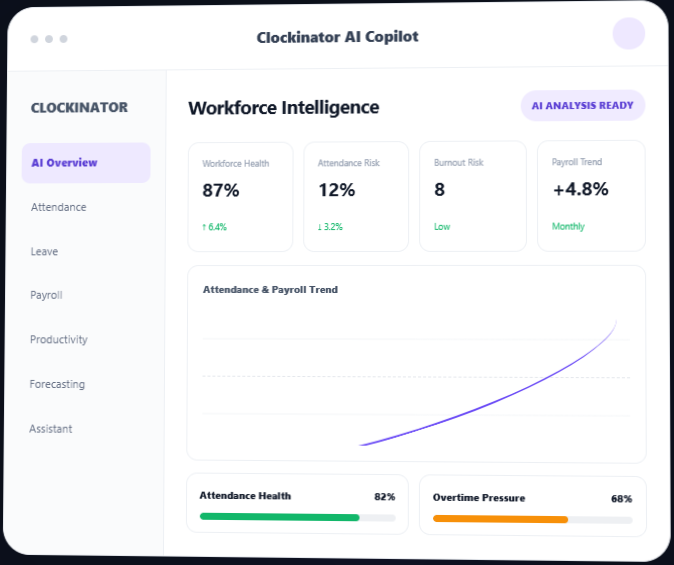
Move from workforcer data to workforce decisions.
Clockinator Pro already gives you the data needed to manage employees, attendance, leave, projects, payroll and reports. AI Copilot adds an intelligence layer that helps your team understand that data faster and decide what deserves attention next.
Understand what is happening
AI summaries across attendance, leave, payroll and productivity.
Spot risks earlier
Attendance anomalies, overtime and burnout signals.
Ask your workforce data
Natural-language questions through the AI Assistant.
Plan ahead
Forecast attendance, leave, payroll and overtime.
Automate repeatable actions
Conditional rules with notifications and review flows.
Keep control
Budgets, limits, logs, roles and retention settings.
Everything you need to make Clockinator smarter
Purpose-built AI modules work with your Clockinator Pro workforce context to answer the questions that matter
Attendance Intelligence
Detect late arrivals, missed checkouts, unusual patterns and attendance risk.
- Late-arrival analysis
- Anomaly detection
- Department health
- Employee risk breakdown
Leave Intelligence
Analyze leave requests against balances, availability, workload and history.
- AI leave recommendations
- Availability signals
- Leave trends
- Decision-risk queue
Payroll Intelligence
Understand payroll movement, overtime pressure and department-level cost changes.
- Payroll growth analysis
- Overtime drivers
- Department cost breakdown
- Payroll risk signals
Productivity Intelligence
Compare hours, task activity and utilization to reveal productivity patterns.
- Utilization analysis
- Top-performer signals
- Employee comparisons
- Department rankings
Burnout Detection
Identify workload patterns that may indicate burnout risk.
- High-risk employee queue
- Burnout scoring
- Overwork-day analysis
- Workload signals
Timesheet Intelligence
Generate and analyze daily, weekly and monthly timesheet information.
- Employee review flow
- Manager approval context
- Missing checkout detection
- Timesheet summaries
Workforce Forecasting
Project attendance, leave demand, payroll impact and overtime pressure.
- 30/60/90/180-day horizons
- Staffing trends
- Expected leave
- Payroll and overtime forecasts
AI Assistant
Ask workforce questions in natural language from inside WordPress.
- Attendance questions
- Payroll questions
- Project & task context
- Conversation history
Automation Rules
Turn workforce signals into repeatable conditional workflows.
- If / Then logic
- Notifications
- Priority & escalation
- Scheduled runner
Insights Center
Bring generated intelligence together into executive-ready reports.
- Cross-module digest
- Report publishing
- CSV export
- Excel & PDF export
Prompt Templates
Manage reusable AI prompts and tailor analysis to your organization.
- Built-in prompts
- Custom templates
- Default mappings
- AI prompt recommendations
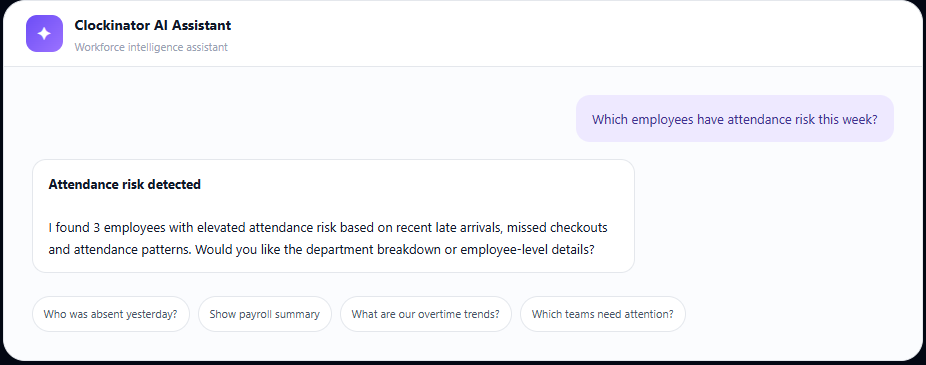
Your workforce data, in plain language
Ask questions without manually opening multiple reports. The AI Assistant uses available Clockinator workforce context to help you get to the answer faster.
Use the AI infrastructure that fits your organization
Connect your preferred provider and choose the deployment approach that fits your budget, performance and data requirements.
Install Clockinator Pro
Connect with an OpenAI API key and configured model.
Install AI Copilot
Connect Claude models through your Anthropic API configuration.
Connect your provider
Use Gemini models through Google AI Studio.
Generate intelligence
Connect to a locally hosted Ollama endpoint and model.
Control cost, access, and stored AI data
Usage controls
Daily and monthly budgets, token limits and hourly request limits.
Role-based access
Control which WordPress roles can access operational AI features.
AI activity logs
Review AI interaction, provider, model and usage information.
Data retention
Configure cleanup of addon data during deactivation and uninstall.
Useful for every team managing people.
1
Install Clockinator Pro
AI Copilot extends the Clockinator Pro workforce system.
2
Install AI Copilot
Activate the addon while Clockinator Pro is active.
3
Connect your provider
Choose OpenAI, Anthropic, Gemini or Ollama.
4
Generate intelligence
Run analyses, use Assistant and create forecasts.
5
Turn insight into action
Review risks, publish reports and automate workflows.
Useful for every team managing people.
HR Teams
Understand attendance, leave, employee risk and workforce trends faster.
Operations
Identify workload, overtime, productivity and staffing signals that need attention.
Payroll Teams
Analyze payroll movement and overtime pressure before payroll hand-off.
Business Owners
Get executive-ready intelligence without moving workforce data into another SaaS dashboard.
Upgrade Clockinator with focused time tracking
The current BeastThemes product page lists Smart Time Tracking at $5/month. Keep or replace this pricing according to your final commercial plan.
Everything you need for AI-powered workforce intelligence.
Add AI-powered analysis, forecasting, natural-language assistance and automation to your Clockinator Pro installation.
11 AI modules
Attendance through Prompt Templates.
4 providers
OpenAI, Anthropic, Gemini and Ollama.
Forecasting
30, 60, 90 and 180-day horizons.
Automation
Conditional rules and scheduled execution.
Ai Copilot
$5
Monthly
- All 11 AI intelligence modules
- AI Assistant
- Workforce Forecasting
- Automation Rules
- Insights Center
- Prompt Templates
- Insights Center
- OpenAI, Anthropic, Gemini & Ollama
- AI usage and cost controls
- AI logs and role-based access
Frequently asked questions
Everything you need to know before getting started.
Does AI Copilot work without Clockinator Pro?
No. AI Copilot is an addon and requires Clockinator Pro to be active.
Which AI providers are supported?
OpenAI, Anthropic, Google Gemini and Ollama are supported.
Can I use a locally hosted AI model?
Yes. The addon includes an Ollama provider configuration for connecting to a local Ollama endpoint and model.
Can the AI Assistant understand Clockinator projects and tasks?
Yes. The addon includes project and task context when those Clockinator data sources are available.
Can I control AI costs?
Yes. Settings include daily and monthly budgets, token limits and hourly request limits.
Can I create custom AI prompts?
Yes. Prompt Templates supports built-in and custom prompts, default mappings and AI-assisted prompt recommendations.
Can I export generated intelligence?
The Insights Center supports CSV, Excel and PDF export for generated insight reports.
Does the addon automatically make workforce decisions?
AI Copilot surfaces analysis, recommendations, risk signals and workflow rules. Organizations should configure and review automated actions according to their own HR and operational policies.
Ready to run Clockinator Pro?
Get pricing, a live demo, or a migration plan for your team — we usually reply the same working day.