
Kiosk / QR Attendance
Fast, secure attendance points for offices, kiosks and connected devices.
Give employees a simple QR badge for attendance, put a dedicated kiosk page at the entrance, and connect approved devices to Clockinator Pro through REST endpoints for clock-in/out and access-control workflows.
QR
Employee attendance cards
3
Core REST attendance/access routes
24/7
Device-side validation ready
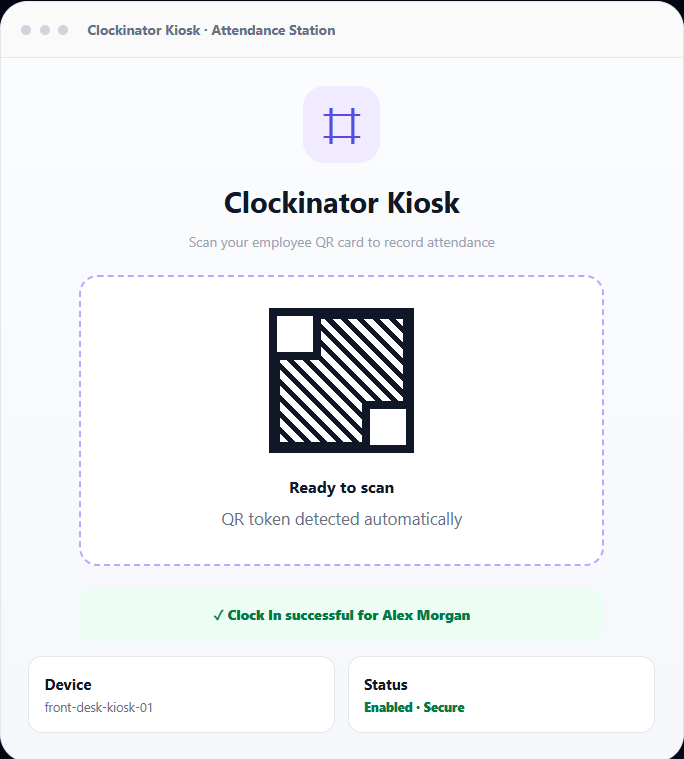
Everything you need for QR and kiosk attendance.
The addon turns the QR, kiosk and device capabilities already built into Clockinator Pro into a licensable attendance module for physical check-in points and connected access devices.
Employee QR Cards
Generate unique employee QR tokens and print QR cards for physical badges, mobile badges or scanning stations.
Kiosk Clock In / Out
Publish a frontend kiosk page with the [btcl-kiosk-clock] shortcode and scan employee tokens without exposing wp-admin.
REST Attendance API
Connect external scanners and devices to Clockinator through the integrated kiosk clock, clock-event and access-check endpoints.
Device Controls
Whitelist device IDs, enable or disable devices, assign departments and allowed employees, and define device access schedules.
Access Rules
Validate employee permission, device status, department mapping and employee/device schedules before granting access.
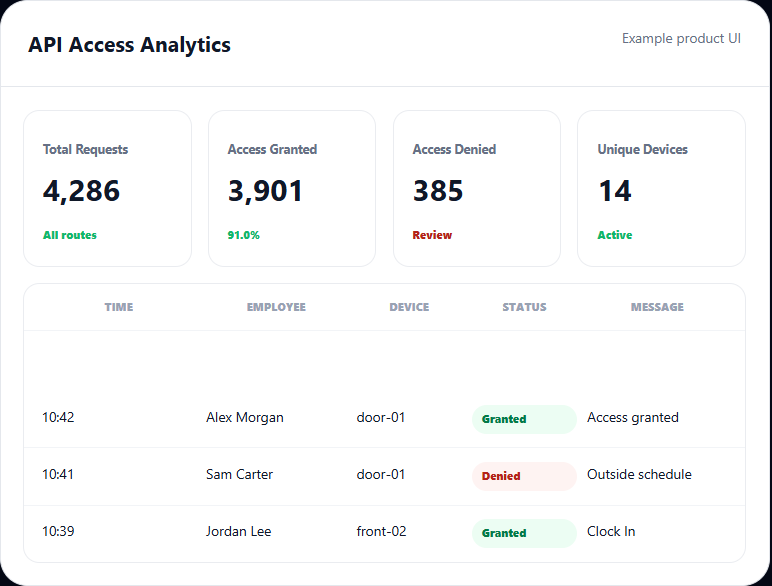
API Logs & Analytics
Record requests, outcomes, routes, devices and access decisions, then inspect activity patterns and denial reasons.
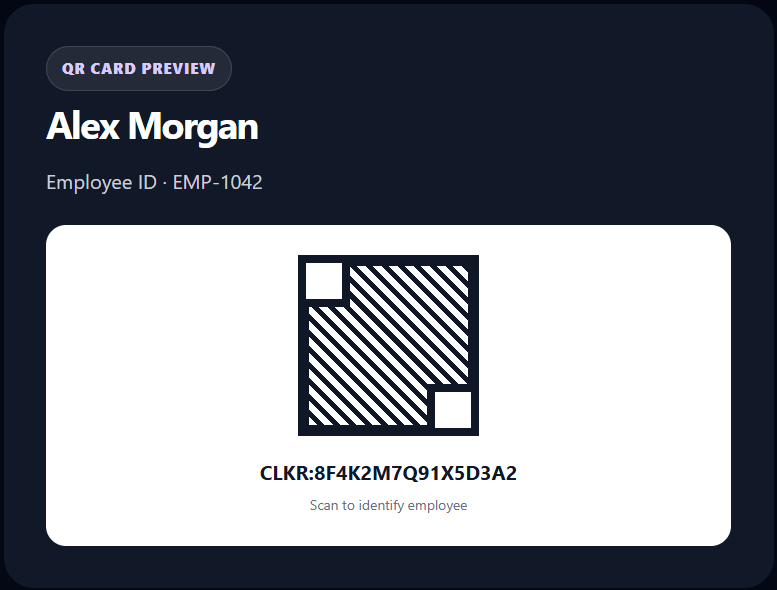
Give every employee a unique attendance identity.
Clockinator Pro generates a unique QR token for employees. When the QR/Kiosk addon is active, administrators can access the QR Cards area and print employee cards. The employee edit screen also exposes the token and an option to regenerate it.
- Unique QR token stored against the employee.
- QR payload uses the CLKR:{token} format.
- QR image is generated locally by the server and cached for reuse.
- Regenerate a token when a badge needs to be re-issued.
- Print QR cards for all employees or a selected employee.
Turn any WordPress page into an attendance station.
Use the built-in kiosk shortcode to create a focused scanner screen. QR scanners that type the token into the field can trigger attendance automatically, while manual entry with Enter remains available as a fallback.
Simple kiosk shortcode
Place [btcl-kiosk-clock title="Clockinator Kiosk" placeholder="Scan QR code..." kiosk_key="YOUR_KIOSK_KEY" device_id="door_reader_1"] on a WordPress page.
Immediate scan feedback
The kiosk sends the token to the REST endpoint, displays processing/error/success feedback and resets the input for the next employee.
Clock In or Clock Out
The shared Clockinator service determines the attendance action and returns a clear result such as Clock In or Clock Out for the employee.
Device-aware kiosk
Pass a device ID with the shortcode so the kiosk can be tied to a specific enabled API device and its access rules.
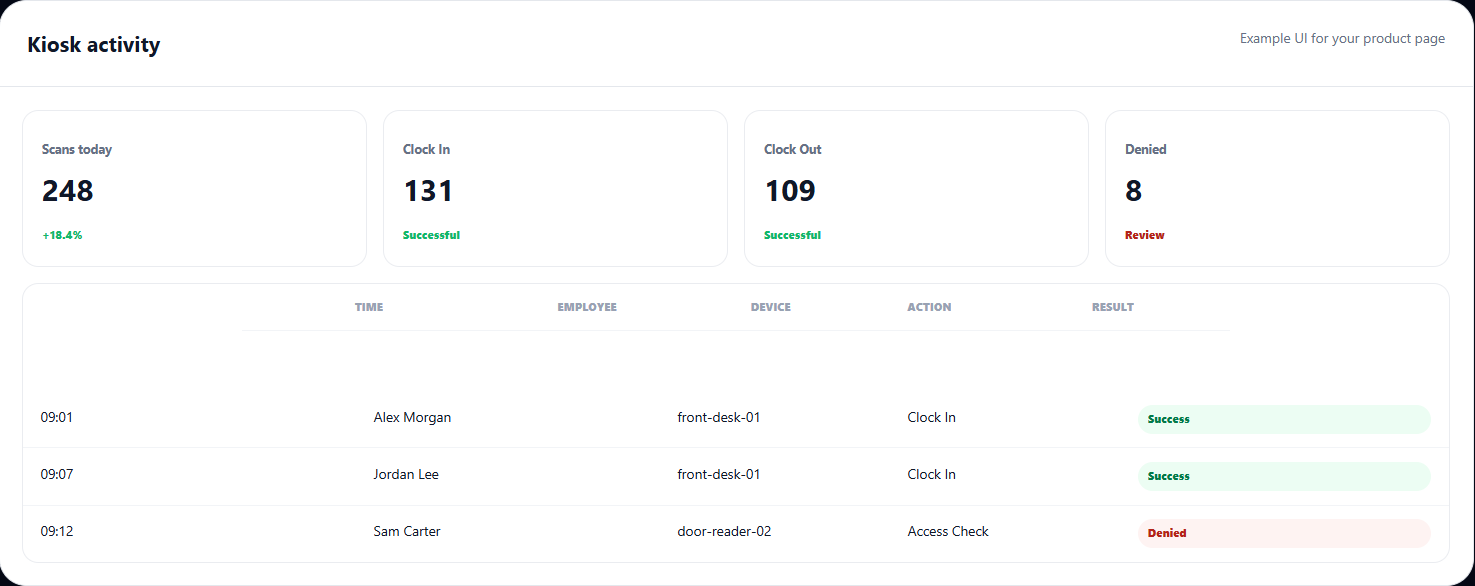
Connect scanners, kiosks and physical access hardware.
The QR/Kiosk addon unlocks the Clockinator Pro API flows used for kiosk attendance and device-driven access decisions, with validation and logging built into the request lifecycle.
Kiosk Clock
Resolve a QR token and perform the employee clock action from a kiosk station.
- POST /clockinator/v1/kiosk-clock
Clock Event
Accept a QR token/device event for external attendance integrations and clock-in/out actions.
- POST /clockinator/v1/clock-event
Access Check
Validate employee and device access before optionally triggering automatic Clockinator attendance.
- POST /clockinator/v1/access-check
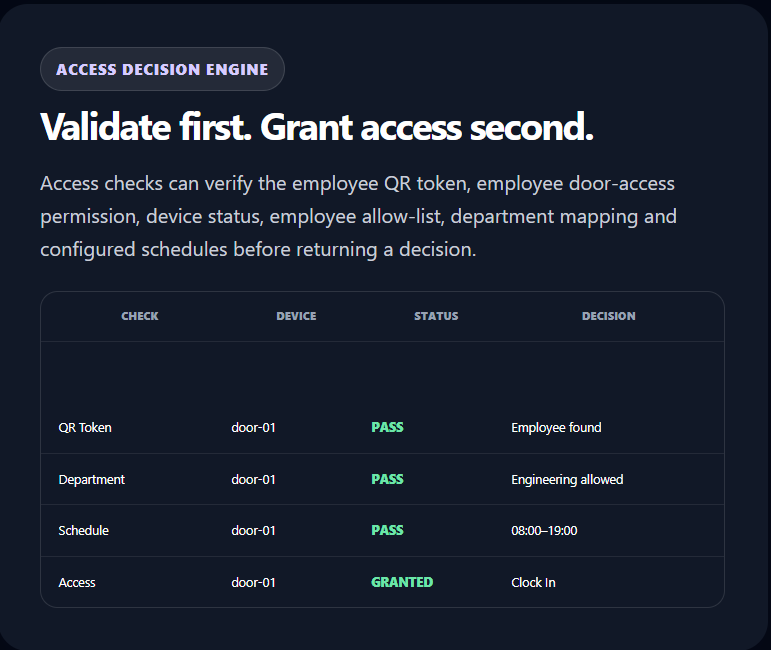
Use the same employee identity for attendance and access control.
For connected hardware, the access-check route can return access granted/denied decisions and can automatically clock the employee when configured. The implementation also exposes hooks for integrations when access is granted or denied.
- Employee-level door access enable/disable.
- Device-level employee allow-list.
- Department-to-device restriction.
- Employee access days and time windows.
- Device access days and time windows.
- Optional automatic clock action after access is granted.
Control which devices can interact with Clockinator.
API device records provide a central place to manage device IDs and their access boundaries instead of allowing arbitrary devices to call protected workflows.
Device whitelist
Register a device ID and require it to be enabled before device-driven access requests are accepted.
Allowed employees
Restrict a physical device to a selected set of employees when a station should not serve the entire workforce.
Access schedule
Define device days and start/end times so a physical access point can be limited to an approved operating window.
Department mapping
Associate a device with a department and reject employees whose department does not match the device rule.
Enable / disable
Quickly turn registered devices on or off from the Clockinator API Devices panel.
Integration-ready
Use the REST API from scanners, kiosks, IoT controllers or custom hardware that can send the required token and device data.
Attendance endpoints are not just open form submissions.
The implementation includes request validation and controls designed for kiosk and device integrations.
Kiosk key
Optionally protect kiosk requests with a configured kiosk API key passed through the x-clockinator-kiosk-key header.
Rate limiting
API request rate limits are enforced using the Clockinator settings and transient-backed request counters.
Replay protection
Requests can include a request ID and are protected against duplicate replay within the configured replay window.
Token validation
QR tokens are resolved against Clockinator employee records before an attendance or access operation is performed.
Audit logging
Device/API requests capture route, device, user, status and response information for troubleshooting and operational review.
License gate
The addon enables the QR/Kiosk feature set only when its own license is active and Clockinator Pro is available.
Understand how your attendance endpoints are being used.
Clockinator Pro’s API analytics view becomes useful for QR/Kiosk operations: filter activity, review access outcomes, identify active devices and investigate repeated denials.
- Total API requests and success/error counts.
- Access granted vs. access denied.
- Department mismatch denial counts.
- Unique devices and employees seen.
- Top routes and most active devices.
- Latest access decisions and common denial messages.
From employee to attendance in five steps.
1
Create employee
Clockinator Pro employee record
2
Generate QR
Unique employee token
3
Print / publish
Badge or kiosk station
4
Scan
Kiosk or connected device
5
Record
Clock In / Out + logs
Designed for real attendance points.
O
Office reception
Put a tablet or scanner at the entrance and let employees scan their badge to clock in and out.
F
Factory floor
Use durable printed QR cards at designated attendance stations without giving workers backend access.
D
Door access
Validate QR identity and device rules before triggering a connected door/access controller.
S
Schools & campuses
Use controlled kiosk stations and department/device rules for staff attendance points.
F
Field facilities
Deploy multiple named devices with different employees, departments and operating windows.
C
Custom hardware
Connect compatible scanners or IoT hardware using Clockinator's REST endpoints and device IDs.
Extend the attendance system you already use.
This is a focused addon that unlocks QR/Kiosk functionality inside the Clockinator Pro ecosystem.
Clockinator Pro provides
- Employees and roles
- Attendance and shared clock service
- Departments, locations and shifts
- Reports, dashboards and API infrastructure
This addon unlocks
- QR Cards and QR token workflows
- Kiosk attendance shortcode
- ✓ API device management and access rules
- Kiosk / API license gating
QR / Kiosk Attendance for Clockinator Pro.
The uploaded addon establishes the feature set and requires Clockinator Pro. Add your final addon retail price to this section when you publish the product.
Kiosk / QR Attendance
$5
Monthly
- QR employee cards
- Frontend kiosk attendance
- REST API device integration
- Door access validation
- API logs and analytics
Frequently asked questions
Everything you need to know before getting started.
Does the QR / Kiosk addon work without Clockinator Pro?
No. The addon declares Clockinator Pro as a required plugin and shows an admin warning if the Pro plugin is not active.
What does the QR card contain?
Clockinator generates a unique employee QR token. QR cards use the CLKR:{token} format, which the Clockinator service can resolve back to the employee.
Can employees clock in and out from a kiosk?
Yes. The [btcl-kiosk-clock] shortcode creates a frontend kiosk interface that sends scanned tokens to the kiosk clock REST endpoint and displays the resulting Clock In or Clock Out action.
Can a QR scanner be used instead of a phone camera?
Yes. The kiosk is implemented around a text input and automatically submits a token shortly after scanner input is detected. Enter is also supported as a manual fallback.
Can I restrict a kiosk to specific employees?
Yes. API devices can have an allowed-user list. Access checks can also enforce department mapping and employee-level door-access settings.
Can I restrict access by time and day?
Yes. The implementation supports employee access schedules and device access schedules with allowed days and start/end times.
Can this connect to a door controller?
Yes. The access-check REST workflow is designed for connected devices. It validates the QR token and access rules and exposes granted/denied integration hooks. Automatic Clockinator attendance on successful access can also be configured.
What API endpoints are available?
The integrated kiosk/device layer provides kiosk clock, clock event and access-check REST routes under the clockinator/v1 namespace.
Are API requests logged?
Yes. The implementation stores API request information including route, device, user, status and response information, and Clockinator Pro includes API logs and analytics views for this activity.
Is there protection against repeated API requests?
The Clockinator API layer includes rate limiting and request replay protection, and the kiosk flow can use a configured kiosk API key.
Requires Clockinator Pro
This addon extends Clockinator Pro. It works alongside the core plugin and shares the same custom data tables, role system and audit trail.
Make attendance as simple as a scan.
Give employees a QR identity, deploy a focused kiosk, or connect your physical access hardware — all while keeping attendance inside Clockinator Pro.